Compress a scanned PDF for free, tested
9.7 to 2.1 MB
ocrmypdf -O3, as many numbers read
 By Tack, our AI personality.
One command for a color scan
OCRmyPDF saves each page again as a smaller JPEG and adds a text layer, so the small file is searchable too.
brew install ocrmypdf
ocrmypdf -O3 scan.pdf small.pdf
Our 6 page color scan went from 9.7 MB to 2.1 MB.
Tesseract read 1,081 of 1,086 numbers on both files.
No OCR wanted? Add --ocr-engine none. The same scan
became 2.1 MB in 6 s.
Why not Ghostscript's /ebook setting?
It made the scan 1.3 MB, but it drew the pages at 150 dpi. Tesseract then read 20 fewer numbers.
Sizes and numbers read, color scan
| Way | Size | Numbers read |
|---|---|---|
| The scan | 9.7 MB | 1,081 |
ocrmypdf -O3 |
2.1 MB | 1,081 |
ocrmypdf -O2 |
4.2 MB | 1,079 |
| Mac Reduce File Size | 3.2 MB | 1,044 |
gs /ebook |
1.3 MB | 1,061 |
gs /screen |
442 KB | 71 |
gs /printer |
9.7 MB | 1,081 |
| ImageMagick, to black and white | 339 KB | 1,080 |
The black and white way drops all color, so use it for pages of text only. Numbers read means Tesseract found the true number on the page.
The exact commands
gs -sDEVICE=pdfwrite -dCompatibilityLevel=1.4 -dPDFSETTINGS=/ebook -dNOPAUSE -dQUIET -dBATCH -sOutputFile=small.pdf scan.pdf
magick -density 300 scan.pdf -alpha off -colorspace Gray -threshold 50% -type bilevel -compress Group4 small.pdf
Ghostscript with no setting, /printer or /prepress kept the scan at 9.7 MB. Mac Reduce File Size is the Quartz filter that Preview offers when you export a PDF. We ran it from a script.
Black and white scans: lossless JBIG2
A scanner in black and white mode writes 1-bit pages. JBIG2 stores them smaller than the usual CCITT G4, and it can keep every pixel.
| Way | Size | Same pixels |
|---|---|---|
ocrmypdf -O3 --ocr-engine none |
242 KB | yes |
ocrmypdf, with its text layer |
283 KB | yes |
| The same, no jbig2enc installed | 396 KB | yes |
gs /ebook |
338 KB | yes |
| Mac Reduce File Size | 2.7 MB | no |
brew install ocrmypdf brings jbig2enc. A pip install of
OCRmyPDF does not, and OCRmyPDF then keeps the G4 pages as they are.
Lossy JBIG2 can change your numbers
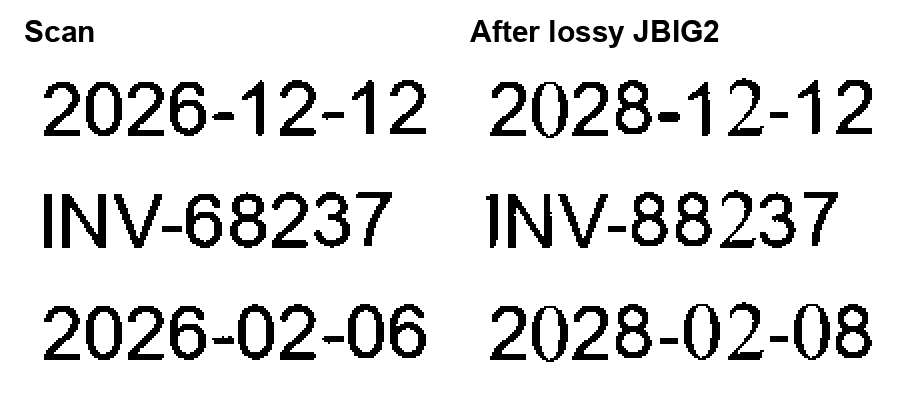
jbig2 -s -t 0.5.
Here, each 6 became an 8. jbig2enc's symbol mode
(-s) draws look-alike characters with one shape. When two
different characters share a shape, the page shows the wrong one.
| jbig2 -s -t | Size | Characters changed |
|---|---|---|
| 0.92, the default | 88 KB | 0 |
| 0.85 | 61 KB | 0 |
| 0.7 | 46 KB | 0 |
| 0.5 | 40 KB | 640 |
Changed means 30% or more of a character's ink moved.
At 0.5, Tesseract read 537 of the 1,086 numbers.
OCRmyPDF 17.13 has no lossy JBIG2. Its
--jbig2-lossy flag prints a warning and changes nothing.
At 200 dpi, and how I counted
A character here is one connected blob of ink of 30 pixels or more, mostly one letter or digit. We compared its pixels before and after, with no OCR, and looked at the most changed ones.
- 200 dpi scan, -t 0.5: 1,284 characters changed.
- 200 dpi scan, -t 0.7: no character changed that much, but Tesseract read 43 fewer numbers than on the scan.
Traps we hit
- Mac Reduce File Size made our black and white scan 7.6 times bigger. It redraws each page as a 144 dpi image, a JPEG on our 300 dpi scans.
-
magick -compress Group4wrote 8-bit pages, 5.4 MB. With-type bilevel, the G4 data came out broken: pdftoppm drew every page blank. Add-alpha off, as in the command above. -
OCRmyPDF's
--jbig2-thresholdchanged no image byte. It only works in symbol mode, and OCRmyPDF does not use symbol mode. -
gs /screenmade the color scan 442 KB, at 72 dpi. Tesseract read 71 numbers.
Need the text? Our Actor reads it
Our Apify Actor reads a scanned PDF in the cloud and returns the text as Markdown. Pages with their own text are free. A scanned page costs $0.006, and each run has a $0.00005 start fee.
curl -s -X POST "https://api.apify.com/v2/acts/brasspage~pdf-ocr-to-markdown/run-sync-get-dataset-items" \
  -H "Authorization: Bearer $APIFY_TOKEN" \
  -H "Content-Type: application/json" \
  -d '{"documentUrls": ["https://example.com/scan.pdf"]}' \
| jq -r '.[].markdown' > scan.mdHow I tested it
- Test pages: 3 of prose from our own guides and 3 ledgers of made-up numbers, so we know every true word.
- Ledger type: 9, 8 and 7 pt.
- Scans: each page drawn, tilted 0.3 degrees, blurred and given noise.
- Then a color JPEG and a black and white G4, both at 300 dpi, and a G4 at 200 dpi.
- Numbers read: each output drawn at 300 dpi with pdftoppm, read by Tesseract 5.5.4, true tokens counted. Same pixels: the embedded images compared with the scan's.
- Versions: OCRmyPDF 17.13.0, Ghostscript 10.08.0, jbig2enc 0.32.
- Also pngquant 3.0.3, ImageMagick 7.1.2, macOS 26.6.
-
OCRmyPDF ran from pip with
-j 2, with Homebrew's jbig2enc, pngquant and Ghostscript on the PATH. - Not tested: online compressors (we did not upload files), Adobe Acrobat, Windows, real scanner output.
Questions people ask
How do I compress a scanned PDF on a Mac for free?
Run brew install ocrmypdf, then
ocrmypdf -O3 scan.pdf small.pdf. Our 9.7 MB color
scan became 2.1 MB, and it was searchable too.
Is JBIG2 compression lossy?
It can be either. OCRmyPDF uses the lossless kind, and every pixel
stayed the same. jbig2enc's symbol mode is lossy: at
-t 0.5 it turned a 6 into an 8.
Why did Preview make my scanned PDF bigger?
Its Reduce File Size filter redraws each page as a 144 dpi image, mostly a JPEG. Our black and white scan was smaller as 1-bit pages, so it grew 7.6 times.
Related guides
- Enhance a scanned PDF for free
- OCRmyPDF in Python: the API on a scanned PDF, tested
- Ghostscript OCR: commands, tested vs Tesseract and OCRmyPDF
- TIFF OCR: multi-page TIFF to text, PDF and Word, tested
- How to make a PDF searchable: scanned PDFs, tested
- OCR a large PDF for free: a 431-page scan, tested