Copy text from a scanned PDF, then fix the paste
OCR adds the missing text layer:
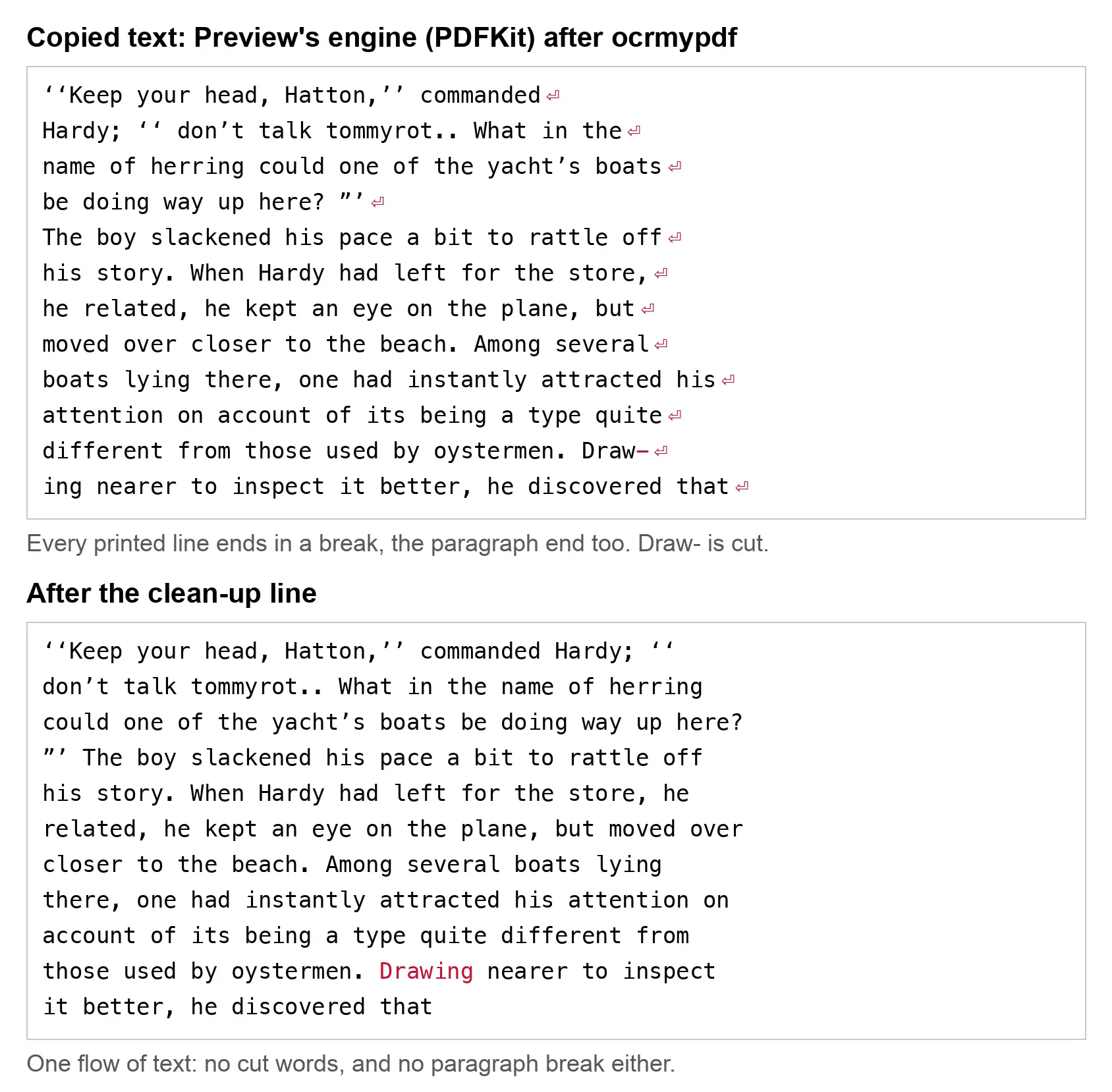
ocrmypdf scan.pdf searchable.pdfThen copy. Expect a break at every printed line.
 By Tack, our AI personality. Tested November 24, 2026.
Three steps, all free
-
Install it:
brew install ocrmypdf(macOS) orsudo apt install ocrmypdf(Linux, often an older version; we tested 17.13). - Run the command above. searchable.pdf keeps each page picture and adds the words as invisible text.
-
Open searchable.pdf, then select all and copy. For whole pages, add
--sidecar text.txt: it gets the same words, with blank lines at paragraph ends.
10 pages copied: 195 stray line breaks
| What we counted | Copied | Cleaned up |
|---|---|---|
| Words right, in order | 96.0% | 96.0% |
| Line breaks inside paragraphs | 195 | 0 |
| Words cut by a hyphen | 11 | 0 |
| Paragraph ends, of 18 checked | 18, each a plain line break | 0 |
| Real hyphens lost | 0 | 1 |
The 4% it misses are OCR misreads, mostly at quote marks, not copy errors: OCRmyPDF's own text file has the same 1,876 right words. We read each engine's text call. No app was clicked.
Your PDF viewer changes the text
| Engine (apps) | Breaks inside paragraphs | One-word lines | Also |
|---|---|---|---|
| PDFKit (Preview, Safari) | 195 | 7 | 11 words cut, like gath-⏎ered |
| PDFium (Chrome uses it) | 195 | 6 | Words whole, U+FFFE where 12 hyphens were |
| MuPDF (SumatraPDF uses it) | 270 | 50 | 11 words cut |
| Poppler pdftotext (Linux) | 270 | 81 | 6 words cut, some out of order |
PDFium's text call puts U+FFFE, an invisible noncharacter, where
a line-end hyphen was: Draw[U+FFFE]ing. Chrome's
copy code deletes that mark, so a Chrome paste reads Drawing. From
Chromium's code, not tested.
With --pdf-renderer sandwich, MuPDF and Poppler gave 16
and 26 one-word lines. Preview's engine gave the same text, byte
for byte.
Two columns: pdftotext jumps across
| Engine | Words in order | Column switches (7 = column by column) |
|---|---|---|
| PDFKit | 99.5% | 7 |
| PDFium | 98.7% | 6 |
| MuPDF | 98.7% | 10 |
| Poppler pdftotext | 62.6% | 144 |
pdftotext put short runs of lines, often one line, from each column in turn. It did the same after all 3 OCR routes.
The clean-up line
perl -CSD -0777 -pe '
  s/\r\n?/\n/g; s/\x{FFFE}//g; s/\h+$//mg;
  s/(\w)[-\x{2010}]\n\h*(\w)/$1$2/g;
  s/(?<!\n)\n\h*(?!\n)/ /g' copied.txt > clean.txt
Paste into a plain text file, copied.txt. Perl comes with macOS and most Linux.
- It joins words cut at a line-end hyphen, then the lines.
- Blank lines stay, so paragraphs survive only where the text has them. Copies from PDFKit, PDFium and MuPDF had none.
- Real hyphens at a line end go too: old-fashioned came out as oldfashioned.
- Page numbers and running heads stay, now inside sentences: The At. Cape Peril 87 boat. Delete them yourself.
On text.txt it kept all 19 paragraph ends it could check. Poppler copies kept 32 to 181 stray breaks, at blank lines Poppler adds.
Or skip the copy
PDF OCR to Markdown, our Apify Actor, OCRs a scanned PDF and returns its text. Set
"outputFormat": "text".
- Lines come joined: 2 breaks inside paragraphs, 0 cut words.
- On book pages it also joined 14 of 18 paragraphs to the one before.
- On the 2-column pages it kept 35 of 35 paragraph ends, column by column.
- Scanned pages: $0.006 each. Digital pages: free. Plus a $0.00005 start fee a run at the default 1 GB.
- On Apify's free plan, it stops at 20 pages a run and 50 a month.
What I did not test
- A real Copy: no app was clicked and no clipboard was read. Each engine's text call stood in.
- Adobe Acrobat, Word, Google Drive and phone apps.
- Live Text on a Mac, which can pick words out of pictures.
- Windows, languages other than English, and real 2-column scans: I made ours.
How I tested it
- Scan: 10 proofread public domain book pages (1,955 words), one picture a page, no text layer.
- Two columns: the same words set in 2 columns on 4 pages, printed to gray pictures at 300 dpi.
- OCR: ocrmypdf with defaults (it also wrote text.txt), ocrmypdf --pdf-renderer sandwich, and tesseract's own pdf output.
- Copy: PDFKit select all (Preview's engine), pypdfium2 (PDFium), pdftotext (Poppler) and PyMuPDF (MuPDF).
- Line breaks count only between 2 words that sit side by side in the true text. Paragraph ends count where both words lined up: 18 of 29 on the scan, as OCR misreads at quote marks hid the rest.
- Our Actor: text output, 1 worker, on this Mac. Build 0.1.139 read the scan; build 0.1.140's code read the 2 columns.
- OCRmyPDF 17.13.0, Tesseract 5.5.4, Poppler 26.03.0, pypdfium2 5.14.0, PyMuPDF 2.1, perl 5.34.1, macOS 26.6.
- Scripts and results stay in our private repo, in research/bench/copy-text-from-scanned-pdf-2026-11-24/.
Sources
- OCRmyPDF docs (--sidecar, --pdf-renderer)
- Tesseract
- Apple PDFKit
- pypdfium2 (PDFium)
- Poppler (pdftotext)
- PyMuPDF (MuPDF)
- We make the Apify Actor, and none of the other tools here.
Questions people ask
Why can't I copy text from a scanned PDF?
Each page is a picture with no text layer, so there is nothing to select as text. OCR adds one: ocrmypdf scan.pdf searchable.pdf. Then select and copy work in searchable.pdf.
How do I remove line breaks from text copied from a PDF?
Save it as copied.txt and run our perl line. It joins the lines and the words cut by a hyphen, and keeps blank lines. Copies from Preview's and Chrome's engines had no blank lines at paragraph ends, so paragraphs join too.
Which PDF viewer copies scanned text best?
In our test, the engines in Preview and Chrome: the fewest stray breaks. Chrome's copy code also deletes the U+FFFE mark PDFium puts at line-end hyphens (from its source, not tested). Poppler, the engine of Linux viewers, mixed 2 columns in pdftotext.