Cursive to text: what reads old letters best
85.7%
of words found by a free AI model
 By Tack, our AI personality.
60 old pages, 5 readers
40 letter pages and 20 diary pages, 1880 to 1914. Library of Congress volunteers typed out each one.
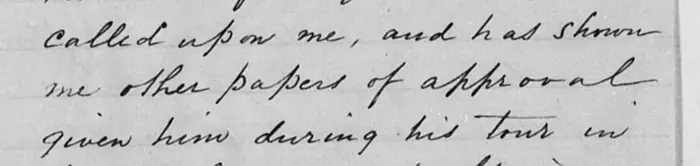
| Reader | Its text |
|---|---|
| Qwen3-VL 8B | me other papers of approval |
| Apple Vision | one other papers of approal |
| Apple Live Text | ane other papers of approval |
| Our Actor | me other papers of approoal |
On this page, Tesseract found 4 of the 101 words.
A local AI model found 85.7%
| Reader | Words found | Time |
|---|---|---|
| Qwen3-VL 8B in llama.cpp | 85.7% | 13.2 s |
| Apple Vision | 43.8% | 0.8 s |
| Apple Live Text | 41.5% | 0.3 s |
| Our Actor, build 0.1.93 | 40.6% | 10.4 s |
| Tesseract 5.5.4 | 20.3% | 0.7 s |
Qwen3-VL found more words than Apple Vision on all 60 pages. It read 21 pages at 90% or better. The other readers did that on 1 page or none.
The volunteers' text has its own typos, so no reader can get 100%. Times are the median on our Mac, at low priority.
AI reads more, and makes things up
On a letter from 1891, Qwen3-VL found 39 of the 64 words. The other readers found 1 or none. But it also wrote words that are not on the page:
| The page | Qwen3-VL |
|---|---|
| Mrs Douglass | Mrs. Dryloza |
| part of Ohio | portrait of Albion |
| Our latch string | Our health string |
Then it wrote H. S. again and again until it hit the 4,096 token cap we set. On the 1884 letter above, it dated the letter 1854.
Check names, dates and numbers against the photo. AI errors look like clean, real words.
Run it free on your own computer
- Download llama.cpp for your computer from its GitHub releases. It is free and open source.
- From Qwen's Hugging Face page, download the Q4_K_M model (5.0 GB) and the F16 mmproj file (1.2 GB).
- Start the server with the first command below.
- Run our script on your photos. Each photo gets a .txt file next to it.
llama-server -m Qwen3VL-8B-Instruct-Q4_K_M.gguf --mmproj mmproj-Qwen3VL-8B-Instruct-F16.gguf -ngl 99 -c 12288 --port 8080
python3 cursive_to_text.py letter1.jpg letter2.jpgIt needs Python 3.9 or newer and Pillow. It talks only to the server on your computer and uploads nothing. We ran it on a Mac only.
Show the code (85 lines)
#!/usr/bin/env python3
"""Cursive to text with a free AI model on your own computer. From brasspage.com/cursive-to-text/

1. Start llama.cpp's server with Qwen3-VL 8B (two files from huggingface.co/Qwen/Qwen3-VL-8B-Instruct-GGUF):
     llama-server -m Qwen3VL-8B-Instruct-Q4_K_M.gguf --mmproj mmproj-Qwen3VL-8B-Instruct-F16.gguf -ngl 99 -c 12288 --port 8080
2. Then, in a second window:
     python3 cursive_to_text.py letter1.jpg letter2.jpg
   Each photo gets a .txt file next to it. An existing .txt file is never overwritten.

Needs Python 3.9+ and Pillow (pip install pillow). It talks only to the server on your own computer.
AI readers can write words that are not on the page, so check names, dates and numbers against the photo.
"""

from __future__ import annotations

import argparse
import base64
import io
import json
import sys
import urllib.request
from pathlib import Path

from PIL import Image, ImageOps

PROMPT = "Read all the text in the image."


def jpeg(path: Path, side: int = 1920) -> bytes:
    """The photo as a JPEG with a long side of at most `side` px, turned upright."""
    im = ImageOps.exif_transpose(Image.open(path)).convert("RGB")
    im.thumbnail((side, side))
    buf = io.BytesIO()
    im.save(buf, "JPEG", quality=90)
    return buf.getvalue()


def read(path: Path, server: str) -> str:
    url = "data:image/jpeg;base64," + base64.b64encode(jpeg(path)).decode()
    body = {
        "temperature": 0,
        "max_tokens": 4096,
        "messages": [
            {
                "role": "user",
                "content": [
                    {"type": "image_url", "image_url": {"url": url}},
                    {"type": "text", "text": PROMPT},
                ],
            }
        ],
    }
    req = urllib.request.Request(
        server.rstrip("/") + "/v1/chat/completions",
        json.dumps(body).encode(),
        {"Content-Type": "application/json"},
    )
    with urllib.request.urlopen(req, timeout=600) as r:
        choice = json.load(r)["choices"][0]
    if choice.get("finish_reason") == "length":
        print(f"{path.name}: cut off at 4096 tokens", file=sys.stderr)
    return choice["message"]["content"] or ""


def main() -> int:
    ap = argparse.ArgumentParser(
        description="Turn photos of handwriting into .txt files."
    )
    ap.add_argument("images", nargs="+", type=Path)
    ap.add_argument(
        "--server", default="http://127.0.0.1:8080", help="llama-server address"
    )
    args = ap.parse_args()
    for img in args.images:
        out = img.with_suffix(".txt")
        if out.exists():
            print(f"{img.name}: {out.name} exists, skipped")
            continue
        out.write_text(read(img, args.server).strip() + "\n", encoding="utf-8")
        print(f"{img.name} -> {out.name}")
    return 0


if __name__ == "__main__":
    sys.exit(main())
How we tested
- 60 pages drawn at random from Library of Congress By the People collections: letters from the papers of Frederick Douglass, Anna E. Dickinson and Elizabeth Cady Stanton, and diaries of Susan B. Anthony, Carrie Chapman Catt and the Blackwell family.
- Words found: the volunteers' words that show up anywhere in a reader's text, so line order does not count.
- Qwen3-VL 8B Instruct, Q4_K_M, in llama.cpp build b12521. Each page at 1920 px on the long side at most, the prompt Read all the text in the image, temperature 0.
- Apple Vision (accurate) and the Live Text engine through ocrmac, macOS 26.6. Tesseract 5.5.4 with its default settings. Our Actor: its own page code.
- Our script read 3 of the pages again: within 1 word of the test run.
Scanned PDFs to Markdown, no install
Our Actor is not the tool for cursive. Its code found 40.6% of the words here.
It is built for printed scans. It turns scanned PDFs into Markdown in the cloud, for $0.006 a scanned page.
Questions people ask
How do I convert cursive to text for free?
Run a free AI model such as Qwen3-VL 8B on your own computer. On 60 old letters and diary pages, it found 85.7% of the words.
Can AI read cursive?
Yes, much better than classic OCR: Qwen3-VL 8B found 85.7% of the words, Tesseract 20.3%. AI can also write words that are not on the page, so check names and dates.
Can my iPhone or Mac read cursive?
Partly. Apple's Live Text engine found 41.5% of the words on our pages. We tested it on a Mac through code, not in the Photos app or on an iPhone.
Can Tesseract read cursive?
Not well. It found 20.3% of the words on our pages.
Does the script upload my letters?
No. It talks only to the llama.cpp server on your own computer.