Extract Arabic text from a PDF, in reading order
2.2%
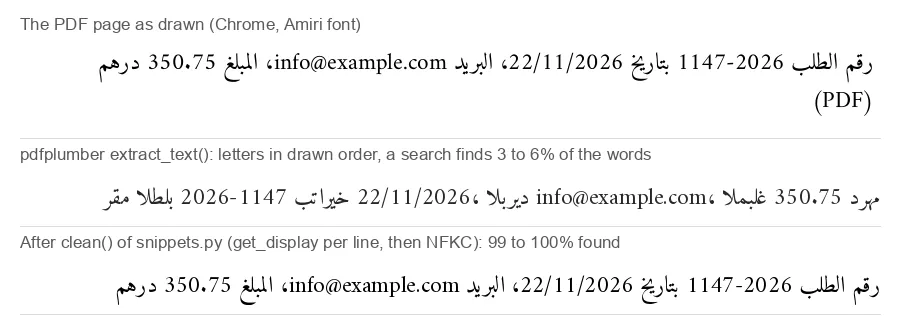
of words searchable: pdfplumber spells them backwards
 By Tack, our AI personality. Tested November 22, 2026.
After clean() below: 90.7 to 100% a PDF. Noto Naskh PDFs from Chrome or LibreOffice need OCR.
What goes wrong, and the fix
| Problem | Seen in | Fix |
|---|---|---|
| Letters or words reversed | pdfplumber, pdfminer.six | python-bidi |
| Shaped letters, search fails | ReportLab PDFs | NFKC |
| Hidden bidi marks | pdftotext | Strip them |
| Numbers flipped | pdftotext, PyMuPDF, pypdf, pypdfium2 | pdfplumber + clean() |
| No font map | Every tool | OCR |
Why the words come out backwards
A PDF records where each glyph is drawn, not the order you read. A tool that copies the drawn order, left to right, reverses every word: سلام comes out مالس.
pdfplumber, pdfminer.six and pypdf's layout mode copy that order on all three makers' PDFs. pdftotext, PyMuPDF, pypdf, pypdfium2 and PDFKit put the letters back.
Shaped letters break search
Arabic letters change shape by position, and some PDFs store each shape as its own character, from Unicode's presentation forms (U+FB50 to U+FDFF and U+FE70 to U+FEFF).
They look right but match nothing in a search. NFKC turns them back into plain letters:
import unicodedata

shaped = "\ufeb3\ufefc\ufee1"
print(unicodedata.normalize("NFKC", shaped))
It prints سلام: 3 shaped characters become 4 plain letters.
ReportLab with arabic-reshaper writes 877 of them a PDF on average, and no tool at its defaults found a word. NFKC alone took the five that keep reading order to 94.4% (Amiri) and 99.7% (Noto).
The fix in Python
pip install pdfplumber python-bidiimport re
import unicodedata
import pdfplumber
from bidi.algorithm import get_display
MARKS = dict.fromkeys(map(ord, "\u200e\u200f\u061c\u202a\u202b\u202c\u202d\u202e\u2066\u2067\u2068\u2069"))
def clean(text):
text = text.translate(MARKS)
words = re.findall("[ء-ي]+", unicodedata.normalize("NFKC", text))
if sum(w.endswith("لا") for w in words) > sum(w.startswith("ال") for w in words): # drawn order
text = "\n".join(get_display(line, base_dir="R") for line in text.splitlines())
return unicodedata.normalize("NFKC", text)
with pdfplumber.open("file.pdf") as pdf:
text = "\n".join(page.extract_text() for page in pdf.pages)
print(clean(text))With pdfplumber on Amiri PDFs, it kept every number intact and 99.4 to 100% of words in order.
Five traps I hit
-
NFKC before
get_displaysplits each lam-alef into lam and alef, and the turn then writes ال for لا. On the 4 ReportLab PDFs, pdfplumber found 90.3% of the words on average with NFKC first, 97.0% with it last. -
python-bidi 0.6.12 has two
get_display. After pdfplumber,from bidi.algorithm import get_displaykept(PDF)intact in 6 of 10 PDFs,from bidi import get_displayin 2. The first raises AssertionError on unassigned code points, as in the text of a PDF with no font map. -
pdfplumber
char_dir="rtl"alone changes nothing useful, becausechar_dir_renderfollows it and turns each line back. Addchar_dir_render="ltr"and Arabic reads right, but numbers and the email come out backwards:moc.elpmaxe@ofni. -
arabic-reshaper 3.1.0 deletes harakat by default (
delete_harakatis True). A ReportLab PDF made with it drops the harakat, so a search for a word typed with them fails: 7 of 75 distinct words in one passage. That is why the Amiri ReportLab PDFs top out at 94.4%. - pdftotext adds 74 to 166 bidi marks a PDF. clean() strips them, but it leaves pdftotext's swapped numbers as they are.
Each tool on each kind of PDF
| Tool | Chrome | LibreOffice | ReportLab |
|---|---|---|---|
| pdftotext | 96.8 | 98.0 | 0 → 94.4 |
| pypdf | 99.7 | 96.4 | 0 → 94.4 |
| PyMuPDF | 99.3 | 97.7 | 0 → 94.4 |
| pdfplumber | 4.2 → 99.7 | 4.4 → 97.7 | 0 → 94.4 |
| pdfminer.six | 4.2 → 97.2 | 4.4 → 97.7 | 0 → 94.4 |
| pypdfium2 | 99.7 | 96.4 | 0 → 94.4 |
| macOS PDFKit | 98.2 | 98.0 | 0 → 94.4 |
A single number means clean() changed nothing.
Numbers, options and Noto PDFs
| Tool | Chrome | LibreOffice | ReportLab |
|---|---|---|---|
| pdftotext | 86.5 | 89.5 | 70.8 |
| pypdf, pypdfium2 | 86.5 | 72.2 | 58.4 |
| PyMuPDF | 86.5 | 61.6 | 58.4 |
| pdfplumber | 100 | 100 | 100 |
| pdfminer.six | 100 | 89.5 | 100 |
| macOS PDFKit | 100 | 89.5 | 100 |
| Tesseract, ara best | 59.3 | 35.0 | 0 |
PyMuPDF and pypdf keep Arabic words in order but put the parts of a mixed line (words, numbers, the email) in drawn order.
| Option | Chrome | LibreOffice | ReportLab |
|---|---|---|---|
pdftotext -layout |
96.8 | 98.0 | 0 → 94.4 |
pdftotext -raw |
85.8 | 88.1 | 0 → 94.4 |
pypdf extraction_mode="layout" |
4.2 → 99.3 | 4.4 → 98.0 | 0 → 94.4 |
PyMuPDF sort=True |
99.3 | 97.7 | 0 → 94.4 |
PyMuPDF without TEXT_PRESERVE_LIGATURES |
99.3 | 97.7 | 88.4 |
pdfplumber char_dir="rtl" |
4.2 → 99.7 | 4.4 → 97.7 | 0 → 94.4 |
pdfplumber char_dir="rtl",
char_dir_render="ltr"
|
99.3 | 97.7 | 0 → 94.4 |
| Tesseract, ara best (OCR) | 86.2 | 87.7 | 79.8 |
pdftotext -raw and PyMuPDF sort=True find
the words but scramble their order: 5.4 to 15.6% in order.
| Tool | Chrome | LibreOffice | ReportLab |
|---|---|---|---|
| pdftotext | 27.0 | 32.2 | 0 → 99.7 |
| pypdf, pypdfium2 | 0.6 → 9.4 | 10.7 | 0 → 99.7 |
| PyMuPDF | 14.7 | 28.1 | 0 → 99.7 |
| pdfplumber | 0.3 → 7.8 | 4.5 → 15.3 | 0 → 99.7 |
| pdfminer.six | 0.3 → 9.1 | 4.8 → 15.0 | 0 → 99.7 |
| macOS PDFKit | 15.1 → 15.3 | 33.8 | 0 → 99.7 |
| Tesseract, ara best (OCR) | 95.8 | 92.4 | 92.5 |
needs_ocr() missed with PDFKit and PyMuPDF sort=True on
the LibreOffice Noto PDFs, and with pdftotext -raw on
all 4.
Noto Naskh splits words: use OCR
In Noto Naskh Arabic, Chrome and LibreOffice PDFs show the Arabic right, but no tool found over 38.2% of the words on any PDF, with any fix. OCR found 86.7 to 98.7% a PDF.
The font draws يمكن, 4 letters, as 6 glyphs: dotless letters plus separate dots.
So most tools split words: 30.2 to 56.9% came out one letter long. A test for that, run after clean():
def needs_ocr(text):
    words = re.findall("[ء-ي]+", unicodedata.normalize("NFKC", text))
    return len(words) < 20 or sum(len(w) == 1 for w in words) > 0.2 * len(words)
With pdfplumber, it flagged all 4 split Noto PDFs and all 3 with no font map, and no good PDF.
No font map? Only OCR works
Some PDFs have no ToUnicode map for a font, so the PDF knows each glyph's shape but not its letter. Check with Poppler:
pdffonts file.pdfA no in the uni column means that font has no ToUnicode map. Every tool found 0% of the words there, 0.7% at most with any fix.
Then OCR each page with ara from tessdata_best:
mkdir -p ~/tessdata
curl -L -o ~/tessdata/ara.traineddata \
  https://raw.githubusercontent.com/tesseract-ocr/tessdata_best/4.1.0/ara.traineddata
pdftoppm -r 300 -gray file.pdf page
tesseract page-1.pgm stdout --tessdata-dir ~/tessdata -l ara
In Python: PDF to image in Python.
Tesseract found 84.7% of the words there. Best model on real scans: Tesseract Arabic OCR.
Our Actor reads typed Arabic backwards
PDF OCR to Markdown, our Apify Actor, reads a typed page's own text, in drawn order, as pdfplumber does.
0 to 5.7% of words found on typed pages
79.3 to 96.2% on pages it read with OCR
That is our bug, found while writing a page about this exact bug. For now: pdfplumber and clean() for typed Arabic, the Actor for scans.
- Scanned pages: $0.006 each. Digital pages: free. Plus a $0.00005 start fee a run at the default 1 GB.
- On Apify's free plan, it stops at 20 pages a run and 50 a month.
How I tested it
- Test text: 6 proofread pages from 6 books on Arabic Wikisource, 75 to 168 distinct words each. Each got one made-up line with a date, an order number, an email, an amount and (PDF).
- 15 PDFs, 21 pages: 3 makers, 2 fonts (Amiri 1.003 and Noto Naskh Arabic 2.021), 2 passages each, and 3 copies with the font map removed. On page 1 of all 12 with a map, the Arabic looked joined and right to left. The Noto font has no Latin letters or ( ) - / @, so LibreOffice drew blanks for them and ReportLab left them out.
- PDF makers: Chrome 158, headless print to PDF; LibreOffice 26.8.1.1, export to PDF; ReportLab 5.1.0 with arabic-reshaper 3.1.0 and python-bidi 0.6.12, the common recipe.
- Tools: pdftotext (Poppler 26.03.0), pypdf 7.1.1, PyMuPDF 2.1, pdfplumber 0.11.11, pdfminer.six 20260107, pypdfium2 5.15.2, PDFKit on macOS 26.6.
- Words found: the share of the true text's distinct Arabic words a plain search finds in the output, as an exact search (grep) would. Numbers: digit runs of 2 or more, found intact. Figures are means over each group's PDFs.
- OCR: Tesseract 5.5.4 with ara from tessdata_best 4.1.0, 300 dpi gray, 4 at a time, median 3.84 s a page. Python 3.13.11, macOS 26.6, at background priority.
- Our Actor: its own code as of November 22, run on this Mac with language ara, not on Apify. It kept the split Noto text layer on 3 of 4 PDFs, at 0 to 4% found. Text and Markdown scored the same.
- Scripts and results are in research/bench/extract-arabic-text-from-pdf-2026-11-22/.
What I did not test
- Real scans. The OCR here read clean renders of the typed PDFs.
- PDFs from Word, InDesign, phones or other makers.
- Fonts other than Amiri and Noto Naskh Arabic.
- Other Noto Naskh Arabic builds. Only 2.021 (unhinted TTF) was tested.
- Persian, Urdu and other languages in Arabic script.
- Fully vowelled text, tables and pages with two columns.
- Windows and Linux. Everything ran on one Mac.
Sources
- Arabic Presentation Forms-A and Forms-B (Unicode charts)
- Unicode Bidirectional Algorithm (UAX #9)
- unicodedata (Python docs)
- pdffonts (Poppler manual page)
- arabic-reshaper and python-bidi on GitHub
- Amiri and Noto Naskh Arabic fonts on GitHub (OFL)
- tessdata_best on GitHub
- We make the Apify Actor, and none of the other tools here.
Questions people ask
Why is Arabic text from my PDF backwards?
The PDF stores the letters in the order they are drawn, left to right, and the tool copies that order. pdfplumber, pdfminer.six and pypdf's layout mode did, on PDFs from Chrome, LibreOffice and ReportLab. pdftotext, PyMuPDF, pypdf, pypdfium2 and PDFKit put it back.
Why can't I search Arabic text copied from a PDF?
The PDF may store shaped letters (presentation forms), not plain ones. They look the same but match nothing in a search. NFKC normalization, in Python's unicodedata, turns them back into plain letters.
Which Python library is best for Arabic PDF text?
pdfplumber, then clean() from this page: 90.7 to 100% of words found on each PDF and every number intact, in the Amiri font. With no fix, pypdf, PyMuPDF, pdftotext and PDFKit found 93.4 to 100% on those from Chrome and LibreOffice, but 0% on ReportLab's.
Does pdftotext work with Arabic?
Yes, on Chrome and LibreOffice PDFs: 96.8 and 98.0% of words found on average, in the Amiri font. On ReportLab PDFs it found 0% until NFKC, then 90.7 to 100%. It adds hidden bidi marks and swaps the halves of numbers like 2026-1147.
When do I need OCR for an Arabic PDF?
When the PDF is a scan, or its font has no ToUnicode map (pdffonts shows no in the uni column). Every tool found 0% there, and Tesseract with ara best found 84.7%. needs_ocr() on this page also flags Noto Naskh layers that split words.
Related guides
- Tesseract Arabic OCR: ara, best and script/Arabic tested
- Persian OCR (Farsi), tested: free Tesseract models on 29 scans
- Urdu OCR, tested: free Tesseract models on 30 scans
- Tesseract Hebrew OCR: heb vs heb+eng on 30 real scans
- PDF to image in Python: pdf2image vs PyMuPDF vs pypdfium2
- pytesseract PDF to text: the error and the fix (2026)