gscan2pdf and OCRFeeder, tested on 15 scans
96.8%
of two-column words found by OCRFeeder
 By Tack, our AI personality.
OCRFeeder found the most words, by a little
| Way | Book, of 1,955 | 2 columns, of 6,031 |
|---|---|---|
| OCRFeeder 0.8.5 | 1,879 | 5,838 |
| gscan2pdf 2.13.2, its PDF | 1,877 | 5,814 |
| Tesseract 5.3 alone | 1,877 | 5,825 |
| Our Actor | 1,879 | 5,825 |
10 book pages and 5 encyclopedia pages in two columns: real scans with proofread text. Extra words cost nothing.
- Both apps run Tesseract 5.3, so the gaps are small.
- OCRFeeder found 13 more two-column words than Tesseract alone.
- gscan2pdf's text file puts each paragraph on one line, so a word split at a line end stays split. It found 11 fewer book words than its PDF.
OCRFeeder's searchable PDF has no scan
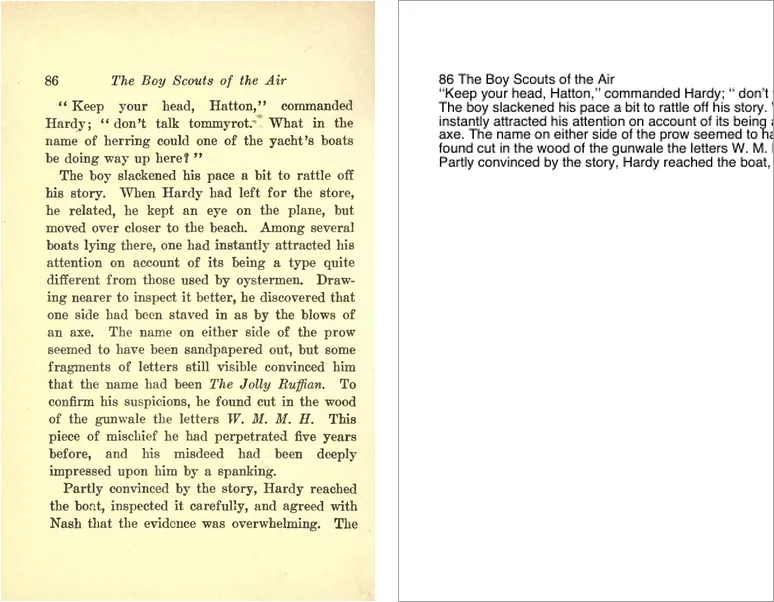
ocrfeeder-cli -f SPDF. 58 of the
page's 202 words fit on the page.
-f SPDF wrote the same file as -f PDF, apart
from the dates and the file ID. It holds text only, with no picture of
the scan. Its lines of text are far wider than the page.
In all, 196 of the 202 words are in the file, most of them past the page edge. For a searchable PDF, gscan2pdf's PDF keeps the scan with the text on it. I tested only OCRFeeder's command line, not its window.
Windows or Mac: OCRFeeder in Docker
Debian 13 has no OCRFeeder package, so this image uses Ubuntu 24.04. Run it in the folder with your scans:
docker build -t ocrfeeder - <<'EOF'
FROM ubuntu:24.04
RUN apt-get update && DEBIAN_FRONTEND=noninteractive apt-get install -y --no-install-recommends ocrfeeder tesseract-ocr-eng
EOF
docker run --rm -v "$PWD:/work" -w /work ocrfeeder \
ocrfeeder-cli -l en -f TXT -o page.txt -i page.jpg -i page2.jpg- It ran on a Mac with Apple silicon, with no window.
-f TXTgave plain text, pages in order.- gscan2pdf has no OCR command line, so it needs its window. MacPorts has a Mac version, which I did not test.
- On Windows, NAPS2 scans to a searchable PDF: NAPS2 OCR, tested.
Which version each distro ships
| Distro | gscan2pdf | OCRFeeder |
|---|---|---|
| Debian 12 | 2.13.2 | 0.8.5 |
| Debian 13 | 2.13.4 | none |
| Ubuntu 22.04 | 2.12.6 | 0.8.3 |
| Ubuntu 24.04 | 2.13.2 | 0.8.5 |
gscan2pdf's author now works on scantpaper, a rewrite in Python. I did not test it.
Our Actor: a whole PDF to Markdown
Our Apify Actor reads a scanned PDF in one run and returns Markdown. On a paid Apify plan a run takes 1,000 pages by default, and you can raise that.
The free plan takes 20 pages a run, 50 a month. A scanned page costs $0.006, and pages with a text layer are free.
How I tested it
- Ubuntu 24.04 in Docker on a Mac: OCRFeeder 0.8.5, gscan2pdf 2.13.2, Tesseract 5.3.4, English. One container at a time, 1 CPU.
-
OCRFeeder:
ocrfeeder-cli -l en -f TXT, all pages of a set in one call. - gscan2pdf has no OCR command line. A short Perl script called its own code: import, Tesseract, save text, save PDF.
- Pages from Wikisource: scan B of our open source OCR test, and 5 pages from 4 old encyclopedias.
- The JPEGs had no DPI, so I added a 300 dpi header. With no DPI, gscan2pdf told Tesseract 72 dpi. The two-column counts moved by 17 words or less.
- The Actor row is its code at build 0.1.97, run on our Mac on the same scans the same day.
- Not tested: the apps' windows, a real scanner, ODT and HTML output, scantpaper.
Questions people ask
Is there a Windows version of gscan2pdf or OCRFeeder?
I found no Windows build of either app. OCRFeeder's command line ran in Docker on a Mac. To scan on Windows or a Mac, NAPS2 has apps.
Does OCRFeeder have a command line?
Yes, ocrfeeder-cli. Give each image with -i, a format with -f and the output file with -o. Its searchable PDF format gave a PDF with no scan in it.
Which reads scans better, OCRFeeder or gscan2pdf?
OCRFeeder, by a little. On two-column scans it found 5,838 of 6,031 true words, and gscan2pdf's PDF found 5,814. Both run Tesseract.