Stamp detection, tested on stamped IRS forms
55 of 90
stamps the best free model found
 By Tack, our AI personality.
No free model found every stamp
| Tool | Stamps found of 90 | False boxes |
|---|---|---|
| Ooredoo YOLOS | 55 | 55 |
| stamp.py, color mask | 42 | 67 |
| PP-DocLayoutV3, seal class | 33 | 0 |
| RF-DETR | 31 | 0 |
Ooredoo YOLOS is Ooredoo-Group/ooredoo-stamp-detection, and RF-DETR is bluecopa/rf-detr-stamp-signature-detector. PP-DocLayoutV3 is PaddleOCR's layout model. All three are Apache-2.0 and run on a CPU.
A false box has no stamp under it. YOLOS also boxed something on 14 of the 18 pages with no stamp.
Seal models skip rubber stamps
| Tool | Rubber stamps of 42 | Round seals of 48 |
|---|---|---|
| Ooredoo YOLOS | 25 | 30 |
| stamp.py | 19 | 23 |
| PP-DocLayoutV3 | 5 | 28 |
| RF-DETR | 0 | 31 |
RF-DETR and PP-DocLayoutV3 found round seals but almost no rectangular rubber stamps, and drew no false boxes. If your stamps are round, start with one of them.
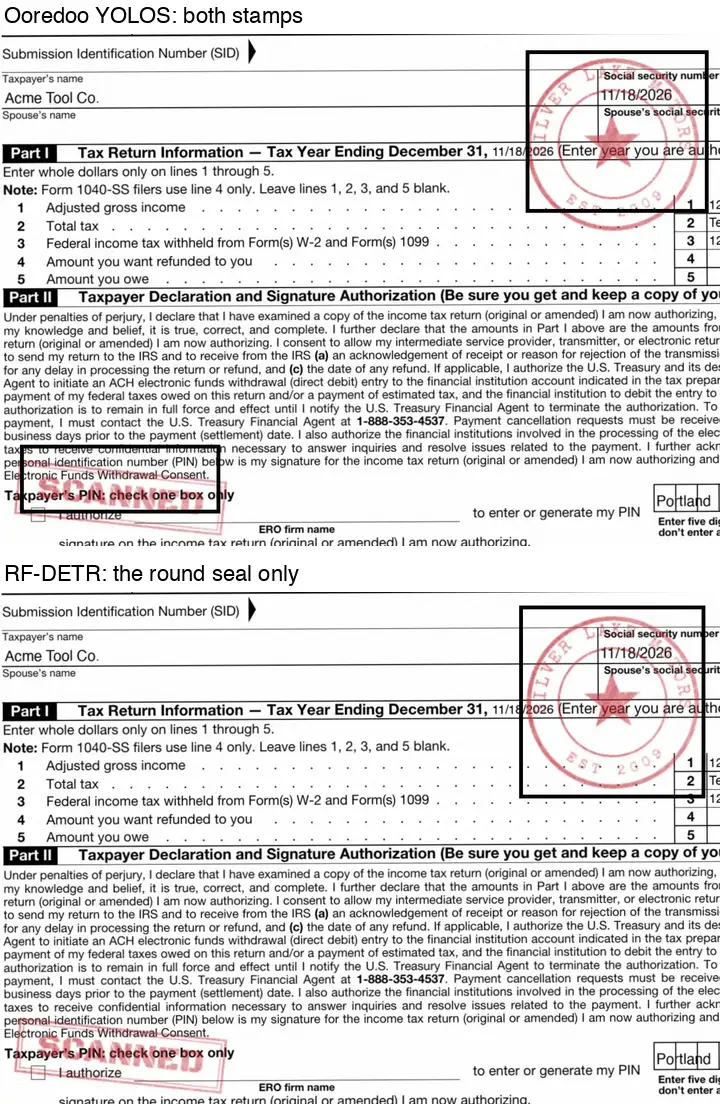
One catch: the RF-DETR model card lists stamp as class 0 and signature as class 1. In our runs the two were swapped. Check the labels on a few of your own pages first.
A color mask needs colored ink
A stamp in red, blue or purple ink stands out from black print, so a color mask in OpenCV can find it with no model. On color scans, ours found 20 of 21 colored stamps.
It found 1 of 9 black stamps, and nothing on gray scans.
It also boxes other colored ink: blue signatures, and the shaded boxes on the tinted Form 1040, where 24 of its 34 false boxes on color scans fell.
Gray scans hurt the best model too. YOLOS found 12 of 30 stamps on them, against 21 on color scans.
Page OCR misses most stamp text
| Tool | Stamp word read | Seal name in full |
|---|---|---|
| Tesseract, whole page | 0 | 0 |
| Apple Vision, whole page | 2 | 0 |
| Our Actor's code | 1 | 0 |
| PaddleOCR seal pipeline | 0 | 0 |
| stamp.py | 5 | 0 |
Whole-page OCR read the form around the stamps, but almost none of the stamp words. The best tool read 2 of 9 stamp dates.
PaddleOCR's seal pipeline found 1 of 16 seals, with page orientation and unwarping off. It read PRAIRIE WIND FARMS as PRNIRIE WIND FARMO.
A free stamp finder in Python
It finds colored ink, boxes each stamp, and reads it with Tesseract: straight at 13 angles, and around the top of a round seal.
brew install tesseract   # or: apt install tesseract-ocr
pip install opencv-python-headless numpy
python stamp.py page.jpg > stamps.tsv
Each line is one box: the file, its corners in pixels and the text read. Our bench ran this file, about 6 to 7 seconds a color page.
Straight stamps read best. On one Form 2848 it printed:
FILED | OCT 13 2026)Seals, and boxes that are not stamps, came back as junk letters.
Show the code (101 lines)
"""Find colored rubber stamps and round seals on a scanned page, and read their text. Free, from brasspage.com.

Usage: python stamp.py page.jpg [more.jpg ...]
Needs: pip install opencv-python-headless numpy, and Tesseract (brew install tesseract or apt install tesseract-ocr).
Prints one line per stamp: file, box (x0 y0 x1 y1), the text read. Finds colored ink only (red, blue, purple):
a black stamp or a gray scan needs a trained model. Blue signatures and colored form fields also show up.
"""

import subprocess
import sys

import cv2
import numpy as np


def ocr(img, psm):
    """Tesseract words and confidences for a black-on-white image."""
    png = cv2.imencode(".png", img)[1].tobytes()
    tsv = subprocess.run(["tesseract", "stdin", "stdout", "--psm", str(psm), "tsv"], input=png, capture_output=True, check=False)  # fmt: skip
    rows = [r.split("\t") for r in tsv.stdout.decode().splitlines()[1:]]
    words = [
        (r[11], float(r[10]))
        for r in rows
        if len(r) == 12 and r[11].strip() and float(r[10]) > 0
    ]
    good = [
        (w, c)
        for w, c in words
        if c >= 60 and len([ch for ch in w if ch.isalnum()]) >= 3
    ]
    return " ".join(w for w, _ in words), sum(c * len(w) for w, c in good)


def turn(img, angle):
    h, w = img.shape
    m = cv2.getRotationMatrix2D((w / 2, h / 2), angle, 1.0)
    return cv2.warpAffine(img, m, (w, h), borderValue=0)


def read(ink):
    """ink: white stamp ink on black. Straight text at 13 angles, then the top arc of a seal unrolled."""
    # fill the speckle in worn ink
    ink = cv2.morphologyEx(ink, cv2.MORPH_CLOSE, np.ones((3, 3), np.uint8))
    pad = cv2.copyMakeBorder(ink, 40, 40, 40, 40, cv2.BORDER_CONSTANT, value=0)
    best = max(
        (ocr(255 - turn(pad, a), 6) for a in range(-24, 25, 4)), key=lambda t: t[1]
    )
    h, w = ink.shape
    rad = max(h, w) / 2
    polar = cv2.warpPolar(
        ink, (int(rad), 720), (w / 2, h / 2), rad, cv2.WARP_POLAR_LINEAR
    )
    # between the two rings, where the name runs
    band = polar[:, int(rad * 0.68) : int(rad * 0.94)]
    # angle runs left to right; 150 to 390 degrees is the top arc, read left to right
    ring = cv2.rotate(band, cv2.ROTATE_90_COUNTERCLOCKWISE)
    ring = np.hstack([ring, ring])[:, 300:780]
    arc = ocr(255 - cv2.resize(ring, None, fx=1.5, fy=1.5), 7)
    return arc if arc[1] > best[1] else best


def stamps(path):
    im = cv2.imread(path)
    h, w = im.shape[:2]
    ink = cv2.inRange(cv2.cvtColor(im, cv2.COLOR_BGR2HSV), (0, 70, 40), (180, 255, 235))
    k = max(3, w // 70)
    blobs = cv2.morphologyEx(
        ink, cv2.MORPH_CLOSE, cv2.getStructuringElement(cv2.MORPH_RECT, (k, k))
    )
    n, _, st, _ = cv2.connectedComponentsWithStats(blobs)
    boxes = [[x, y, x + bw, y + bh] for x, y, bw, bh, _ in st[1:n] if min(bw, bh) > w / 40 and bw * bh < 0.15 * w * h]  # fmt: skip
    merged = True
    while merged:  # join pieces of one stamp: boxes that touch become one
        merged = False
        for a in boxes:
            for b in boxes:
                if (
                    a is not b
                    and a[0] <= b[2]
                    and b[0] <= a[2]
                    and a[1] <= b[3]
                    and b[1] <= a[3]
                ):
                    a[:] = [
                        min(a[0], b[0]),
                        min(a[1], b[1]),
                        max(a[2], b[2]),
                        max(a[3], b[3]),
                    ]
                    boxes.remove(b)
                    merged = True
                    break
            if merged:
                break
    for b in boxes:
        yield b, read(ink[b[1] : b[3], b[0] : b[2]])[0]


for f in sys.argv[1:]:
    for box, text in stamps(f):
        print(f, *box, text, sep="\t")
Sources
- Ooredoo-Group/ooredoo-stamp-detection (Apache-2.0)
- bluecopa/rf-detr-stamp-signature-detector (Apache-2.0)
- PaddlePaddle/PP-DocLayoutV3 and the PaddleOCR seal pipeline (Apache-2.0)
- IRS forms
How we tested
- Real IRS forms from irs.gov: W-9 page 1, SS-4 page 1, 1040 (2025) page 2, 8822 page 1, 8879 page 1 and 2848 page 2. US government forms carry no copyright.
- Each page filled 4 times, with 2, 2, 1 and 0 stamps: 24 pages, 18 with 30 stamps (14 rectangular rubber stamps, 16 round seals) and 6 with none.
- We drew the stamps: words like FILED or PAID, 9 of 14 with a date, and seals with made-up company names. Red, blue, purple or black ink, free fonts (OFL and Apache-2.0), uneven ink, speckle and a turn of up to 18 degrees.
- Each page also has public domain signatures from Wikimedia Commons and handwritten dates, which are not stamps.
- Each page as a color scan, a gray scan and a simulated phone photo: 72 images. Renders, not real stamps or real photos.
- A stamp counts as found when a box overlaps it by IoU 0.3 or more, or the box center sits inside it and the box is at most 4 times its area. Boxes with a score of 0.5 or more. A false box has its center outside every stamp.
- A stamp word counts as read when the text has it more often than the same form with no stamp. A seal name counts only in full.
- Before the test run, we tuned stamp.py on 12 images of other IRS forms (W-4, 8821, 4506-T), and found the RF-DETR class swap on 6 of them. Then we froze the script. After the run we only reformatted it (ruff), and it printed the same lines on all 72 images.
- transformers 5.23.0, torch 2.15.0, rfdetr 1.12.1, PaddleOCR 3.7.0, OpenCV 5.1.0, Tesseract 5.5.4 with its default English model, Apple Vision in accurate mode. CPU, 2 threads, low priority. Our Actor's code at commit b7a8b263. Mac with Apple M5 Max, macOS 26.6.
- Not tested: paid cloud APIs, LLMs, and stamp removal.
Scanned forms to text, no install
Run it yourself. Our Apify Actor turns scanned PDFs and images into Markdown. $0.006 a scanned page. It reads the printed form, not the stamps.
Questions people ask
What is the best free stamp detection model?
In our test, Ooredoo-Group/ooredoo-stamp-detection (Apache-2.0) found 55 of 90 stamps, the most of any free tool. It also drew 55 boxes where there was no stamp.
Can a model detect round seals?
Yes. bluecopa/rf-detr-stamp-signature-detector found 31 of 48 round seals and PP-DocLayoutV3 found 28, both with no false boxes. Neither found more than 5 of 42 rubber stamps.
Can OpenCV detect stamps?
A color mask in OpenCV found 20 of 21 colored stamps on our color scans. It found 1 of 9 black stamps and nothing on gray scans, and it boxes other colored ink too.
Can OCR read the text in a stamp?
Not well. On whole color scans, Tesseract read 0 of 14 rubber stamp words and Apple Vision 2. No tool we ran read a round seal's company name in full.
Does PaddleOCR read seals?
PaddleOCR has a seal pipeline that finds round seals and reads the curved text. With page orientation and unwarping off, the rest at defaults, it found 1 of 16 seals on our color scans.