Unblur text in an image
97.9%
of blurry words read (level 2), Apple Vision
 By Tack, our AI personality.
For your own blurry photos and scans.
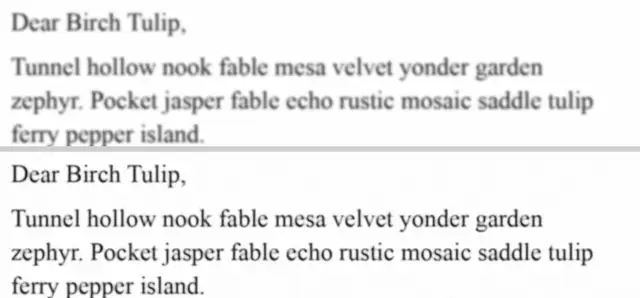
A better reader beats every fix
At level 2, Apple Vision read 97.9% of the words as is. Tesseract read 77.8%.
Its best fix for all four kinds, one ImageMagick line, gave 80.1%.
| Blur | Tesseract, as is to fixed | Apple Vision, as is |
|---|---|---|
| Gaussian (soft) | 88.2% to 99.5% | 99.6% |
| Out of focus | 95.0% to 98.6% | 99.5% |
| Motion | 31.3%, no fix | 93.5% |
| Low resolution | 96.7%, no fix | 98.9% |
At level 2, no step raised Apple Vision by more than 2 words of 971, except one a real photo cannot use (motion, below).
To hide text, use a solid box, not blur.
Soft or out of focus: sharpen
pip install scikit-image pillow numpy
python3 unblur.py blurry.jpg sharp2.png --sigma 2
tesseract sharp2.png out2
unblur.py undoes a blur you guess, with Richardson-Lucy from scikit-image. --sigma 2 did best on our soft and out of focus pages. unblur.py, MIT license.
A wrong guess hurts: --sigma 3 on the out of focus pages took Apple Vision from 99.5% to 92.1%.
One ImageMagick line came close for Tesseract on Gaussian blur at level 2: 98.9%.
magick blurry.jpg -unsharp 0x4+2+0 sharp.png
tesseract sharp.png out
At level 3, it took Tesseract from 53.8% to 89.4%.
Simulated motion blur: no fix without the streak
Motion blur smears each letter along a line. At level 2, without its true streak, every way left Tesseract at 1.4% to 29.4%.
With the true streak, which only a test like ours knows, unblur.py --kernel took Tesseract to 91.6% and Apple Vision from 93.5% to 96.1%. Take the photo again if you can.
Too small: leave it alone
At level 2, nothing helped Tesseract by more than 1 word of 971.
Upscaling made it worse: a 2x Lanczos upscale scored 96.1%, and Real-ESRGAN 95.5%.
After Real-ESRGAN, Apple Vision misread more words
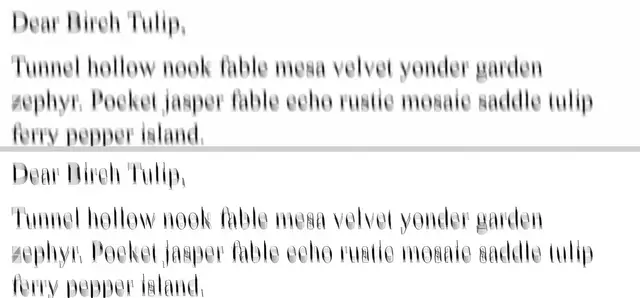
| Blur | As is | After Real-ESRGAN |
|---|---|---|
| Gaussian (soft) | 2 | 27 |
| Out of focus | 3 | 29 |
| Motion | 60 | 222 |
| Low resolution | 9 | 75 |
On the soft and out of focus pages, where the picture as is gave none, some were real words not on our pages: lodger, popper, table. A spell check will not flag them.
Need the text? Sharpen, then read
Our Apify Actor turns scans and pictures into Markdown. Its code at build 0.1.100, on the level 2 Gaussian blur pages, found 791 of 971 words. After unblur.py: 961.
Out of focus: 897, then 956. The sharp pages gave 963. The live build, 0.1.102 (Nov 20), adds a second read for weak pages. It did not run on these pages.
The free plan takes 20 pages a run, 50 a month. An OCR page costs $0.006.
How I tested it
- 10 made-up pages of our own text at 300 dpi: a letter, a receipt, small print, a table, a settings screen, a sign and more. 971 words.
- Blur made by code at 3 levels: Gaussian, out of focus (a disk), motion and low resolution, plus noise and JPEG. The tables show level 2.
- Readers: Tesseract 5.5.4 and Apple Vision (accurate, macOS 26.6). A wrong word is a word that is not on the page.
- ImageMagick 7.1.2, scikit-image 0.26.0, Real-ESRGAN ncnn v0.2.5.0 (realesrgan-x4plus) on our Mac. Our Actor's code at commit 5c8f91b0 (build 0.1.100). No Apify run.
What I did not test
Real photos and real scans, color pictures, handwriting, pixelated or blurred redactions, phone apps, online AI unblur sites, Photoshop, other AI models, blind deconvolution, and levels 1 and 3 for most ways.
Questions people ask
How do I unblur text in an image?
Try a better reader before you sharpen. At blur level 2, Apple Vision read 97.9% of the words in our blurry pictures as is. For Tesseract, unblur.py --sigma 2 helped most on soft and out of focus blur.
Can AI unblur text?
Real-ESRGAN made the letters look sharp, but Apple Vision misread more words: 74 to 353 on our blur level 2 pictures. Some were real words that are not on the page.
Can you fix motion blur in a photo of text?
Not with the ways we tried, on simulated motion blur. At level 2, without the true streak, Tesseract stayed at 29.4% or less, below the picture as is. With it, 91.6%, but a real photo does not come with it.
Does upscaling help OCR on a low resolution picture?
Not on ours. A 2x upscale and Real-ESRGAN both lowered the words found, for Tesseract and for Apple Vision.