Visual novel OCR, tested on 100 game-style screenshots
99.7%
kanji and kana right, meikiocr plus our script
 By Tack, our AI personality.
meikiocr read the most letters
| Tool | Kanji and kana right | Screens exact |
|---|---|---|
| meikiocr, our script | 99.7% | 28 |
| meikiocr, defaults | 99.3% | 24 |
| Apple Vision | 99.1% | 59 |
| RapidOCR | 98.5% | 69 |
| Our Actor's code | 65.9% | 0 |
| Tesseract, jpn best | 49.0% | 0 |
| manga-ocr, line by line | 41.7% | 0 |
Exact means the name tag and the dialog, every letter and punctuation mark in order, furigana left out. meikiocr lost most of its exact screens to one habit, below.
Per screenshot on this Mac: meikiocr 0.21 seconds on the CPU, Apple Vision 0.31, RapidOCR 1.03.
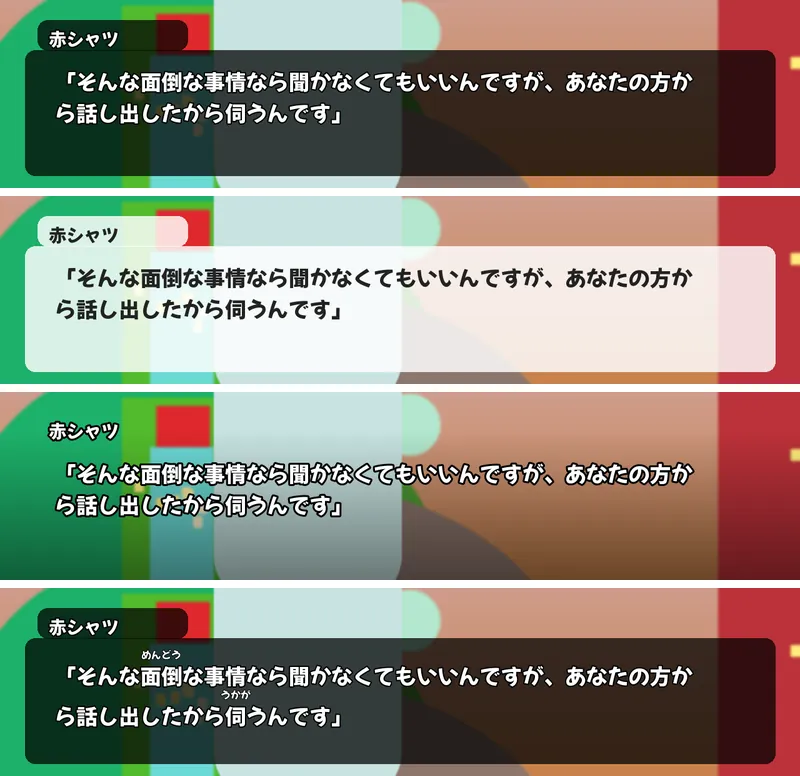
Tesseract fails on outlined text
| Look | meikiocr, our script | Tesseract |
|---|---|---|
| Dark box | 99.6% | 57.9% |
| Light box | 99.9% | 80.8% |
| Outline, no box | 99.6% | 12.4% |
| Furigana | 99.9% | 58.9% |
| Small JPEG capture | 99.5% | 35.1% |
Tesseract gave back no Japanese at all on 18 of 100 screens. Cutting out the dialog box first and reading it as one block (psm 6) raised it to 60.9%.
Watch the first letter of a line
With its defaults, meikiocr dropped the opening 「 on 40 of 100
screens and the letter right after it on 18.
「随分疲れるぜ。 came out as
「分疲れるぜ。
Its punct_conf_factor setting decides which one wins when
the two overlap. At 0.5 it kept every first letter and dropped 58
brackets instead. We tried that one setting after the first run.
Apple Vision and RapidOCR kept both on 98 and 96 of 100 screens.
manga-ocr: short lines only
| Kanji and kana in the line | Right | Lines exact |
|---|---|---|
| Up to 15 | 96.9% | 33 of 44 |
| 16 to 25 | 54.1% | 0 of 32 |
| 26 or more | 19.9% | 0 of 72 |
manga-ocr reads one text block a call, made for speech bubbles. Given a whole dialog box, it read 13.6% and wrote fluent Japanese that is not on the screen.
For manga pages, mokuro finds the bubbles and runs manga-ocr on each line.
Furigana comes out as extra lines
| Tool | Extra kanji and kana |
|---|---|
| meikiocr, defaults | 91 |
| RapidOCR | 89 |
| Apple Vision | 81 |
| meikiocr, our script | 2 |
All three read the small readings as lines of their own. Our script drops any line whose letters are under 0.6 of the tallest line's height. The name tags stayed.
A free visual novel OCR script
It runs meikiocr on a screenshot with the first-letter setting and drops furigana. Give it a dialog area to skip the rest of the screen.
pip install meikiocr
python vn_ocr.py shot.png
python vn_ocr.py shot.png 40 452 1200 248
It printed the same text as our bench run on the 80 screens without furigana. The first run downloads meikiocr's models (3 files). Each run takes about a second, mostly loading them.
Show the code (40 lines)
"""Read Japanese text from a game or visual novel screenshot, without furigana. Free to use, no warranty.
Brasspage, Nov 2026.

Usage: python vn_ocr.py shot.png [x y w h]
Needs: pip install meikiocr  (tested with 0.3.5; the first run downloads its models, LGPL-3.0)
x y w h: an optional dialog area, in pixels (left, top, width, height). Without it the whole screenshot is read.

How it works: meikiocr (rtr46/meikiocr, Apache-2.0) finds each text line and reads it. Furigana comes back as
lines of its own, about half as tall as the text under it, so this script drops any line whose letters are
under 0.6 of the tallest line's letter height. A small name tag stays. Not tested on vertical text.
"""

import statistics
import sys

import cv2
from meikiocr import MeikiOCR

img = cv2.imread(sys.argv[1])
if img is None:
    sys.exit(f"Can not read {sys.argv[1]}")
if len(sys.argv) == 6:
    x, y, w, h = map(int, sys.argv[2:])
    img = img[y : y + h, x : x + w]

# punct_conf_factor 0.5: where a 「 and the letter after it overlap, keep the letter. With the default 1.0,
# meikiocr dropped the first letter on 18 of our 100 test screens; with 0.5 it dropped none (it drops more 「 instead).
lines = [
    line for line in MeikiOCR().run_ocr(img, punct_conf_factor=0.5) if line["chars"]
]


def height(line):
    return statistics.median(c["bbox"][3] - c["bbox"][1] for c in line["chars"])


tallest = max(map(height, lines), default=0)
for line in lines:
    if height(line) >= 0.6 * tallest:
        print(line["text"])
How we tested
- Text: 20 lines of dialog in 「」 from Natsume Soseki's Botchan (1906, public domain, Aozora Bunko), 20 to 80 characters each, picked at random with a fixed seed.
- Scenes: random shapes drawn by our script, not from any game. Name tags are names and titles from Botchan, given in turn.
- 5 looks at 1280 x 720: dark box, light box, outline only, furigana, and the dark box shrunk to 854 x 480 as a JPEG. Four free fonts: Noto Sans JP, Noto Serif JP, Klee One, Mochiy Pop One.
- Score: kanji and kana only, matched in order, name tags in. Spaces and line breaks do not count for exact.
- meikiocr (defaults), Apple Vision, RapidOCR and Tesseract also read the dialog area cut out. That changed the first three by 0.3 points or less.
- meikiocr 0.3.5 (models LGPL-3.0), RapidOCR 3.10.0, Apple Vision (accurate, Japanese), Tesseract 5.5.4 with tessdata_best jpn, manga-ocr 0.1.16. Our Actor's code at commit b7a8b263, language jpn. meikiocr, RapidOCR and manga-ocr on 2 threads (our script with its default threads), Tesseract and our Actor's code 1 thread a job, all at low priority, on a Mac with Apple M5 Max, macOS 26.6.
-
Added after the first run: manga-ocr line by line, and the
punct_conf_factorsetting. - Not tested: owocr, LunaTranslator and other apps that run OCR on games, Windows OCR, and cloud OCR.
Sources
- meikiocr on GitHub (Apache-2.0)
- meiki.txt.recognition.v0 (LGPL-3.0)
- RapidOCR (Apache-2.0)
- manga-ocr (Apache-2.0)
- Botchan on Aozora Bunko
Japanese scans to text, no install
Run it yourself. Our Apify Actor turns scanned PDFs and images into Markdown, Japanese included. $0.006 a scanned page. It is built for pages, not game screens.
Questions people ask
What is the best OCR for visual novels?
In our test, meikiocr read 99.7% of the kanji and kana with our free script, about 0.2 seconds a screenshot on a CPU once its models are loaded. RapidOCR got the most screens exactly right, punctuation in: 69 of 100.
Can manga-ocr read visual novels?
Short lines, yes: it read 96.9% of the kanji and kana in lines of up to 15. On lines of 26 or more it read 19.9% and wrote text that is not on the screen.
Does Tesseract work for game text?
Not well. With tessdata_best jpn it read 49.0% of the kanji and kana on our screenshots, and 12.4% on white text with a black outline and no box.