Auto rename PDFs by what they say
27 of 30
rough scans named right, with a sender list
 By Tack, our AI personality.
Scan_0001.pdf in, a useful name out
It reads page 1, with OCR for scans, and finds the date, sender and kind.
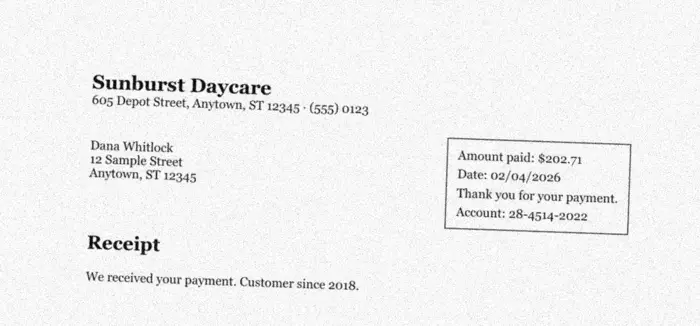
With a sender list, it printed:
Scan_0001.pdf -> 2026-02-04_Sunburst-Daycare_receipt.pdf  (ocr)
Scan_0002.pdf -> 2026-01-20_Paper-Moth-Print-Shop_invoice.pdf  (ocr)
Scan_0003.pdf -> 2025-10-10_Pinecall-Mobile_bill.pdf  (ocr)
A text layer gets 30 of 30
| Text from | With a sender list | No list |
|---|---|---|
| Digital PDF, text layer | 30 | 20 |
| Clean scan, Tesseract | 29 | 20 |
| Rough scan, Tesseract | 27 | 18 |
| Clean scan, our Actor | 27 | 17 |
| Rough scan, our Actor | 30 | 20 |
A scan has no text layer, so a rename tool that only reads text finds nothing on it: 0 of 30. The script runs Tesseract on those pages.
The 3 misses on rough scans
- Scan_0011 and Scan_0017: Tesseract read each statement date with a space inside, such as 1/ 23/26. The script took the end of the statement period instead.
- Scan_0026: Tesseract lost the box with the invoice date, so the name starts with nodate.
The 30 files are made up: 6 kinds of paper, 5 senders each, no real data. We tested no real mail, and yours is likely harder.
The first date is often wrong
A bill lists a due date and a service period. The script skips dates after words like due, pay or from, and prefers a labeled date such as Bill date.
A sender list fixes the sender
With no list, the script takes the first line of words as the sender. On 10 of 30 files that line was something else:
- On 8, a note above the letterhead, like Customer copy
- On 2, the name of the person the mail is to: the logo had spaced letters, so it read as one long word and was skipped
Give it a list of the senders you get mail from, one per line. It finds the closest name anywhere on the page, even with OCR typos.
Run it on your own folder
-
Install poppler and Tesseract:
brew install poppler tesseracton a Mac. - Download rename_pdfs.py. It needs Python 3.9 or newer.
- Run it on a folder. It prints each new name and renames nothing.
- Put your senders in senders.txt, one per line, for better names.
-
Add
--applyto rename. Each change goes to rename-log.csv first. - Add
--undoto put the old names back.
python3 rename_pdfs.py ~/Scans
python3 rename_pdfs.py ~/Scans --senders senders.txt --apply
python3 rename_pdfs.py ~/Scans --undo
It runs on your computer and uploads nothing. It never overwrites a file: a second file with the same name gets _2.
Show the code (255 lines)
#!/usr/bin/env python3
"""Rename PDFs by what they say: 2026-03-04_Copperline-Electric-Co-op_bill.pdf. Free, from brasspage.com/auto-rename-pdf/

Needs Python 3.9+, poppler (pdftotext, pdftoppm) and tesseract on your PATH. Reads page 1 only.
A PDF with a text layer is read directly. A scanned PDF (no text layer) gets OCR with Tesseract.

  python3 rename_pdfs.py FOLDER                          # dry run: prints old -> new, renames nothing
  python3 rename_pdfs.py FOLDER --senders senders.txt    # one known sender name per line (much better names)
  python3 rename_pdfs.py FOLDER --apply                  # renames, and logs each change to FOLDER/rename-log.csv
  python3 rename_pdfs.py FOLDER --undo                   # puts the old names back from that log
"""

from __future__ import annotations

import argparse
import csv
import difflib
import re
import subprocess
import sys
import tempfile
from pathlib import Path

MON = [
    "jan",
    "feb",
    "mar",
    "apr",
    "may",
    "jun",
    "jul",
    "aug",
    "sep",
    "oct",
    "nov",
    "dec",
]
M = r"(?:jan|feb|mar|apr|may|jun|jul|aug|sep|oct|nov|dec)[a-z]*\.?"
DATE = re.compile(
    rf"\b(?:(?P<a>{M})\s+(?P<ad>\d{{1,2}})[,.]?\s*(?P<ay>\d{{4}})"
    rf"|(?P<bd>\d{{1,2}})\s+(?P<b>{M}),?\s+(?P<by>\d{{4}})"
    rf"|(?P<cy>\d{{4}})-(?P<cm>\d{{1,2}})-(?P<cd>\d{{1,2}})"
    rf"|(?P<dm>\d{{1,2}})/(?P<dd>\d{{1,2}})/(?P<dy>\d{{4}}|\d{{2}}))\b",
    re.IGNORECASE,
)
ISSUE = re.compile(
    r"(statement|bill|invoice|notice|issue|receipt|letter)?\s*date( of issue| issued)?\s*:?\s*$",
    re.IGNORECASE,
)
NOT_ISSUE = re.compile(
    r"\b(due|pay|respond|period|from|since|service|before|starting|until|through|claim|message)\b",
    re.IGNORECASE,
)
KINDS = [
    "invoice",
    "receipt",
    "statement",
    "bill",
    "notice",
]  # no match and "Dear ..." -> letter


def text_of(pdf: Path) -> tuple[str, str]:
    t = subprocess.run(
        ["pdftotext", "-layout", "-l", "1", pdf, "-"],
        capture_output=True,
        text=True,
        check=False,
    ).stdout
    if len(re.sub(r"\s", "", t)) >= 30:
        return t, "text layer"
    with tempfile.TemporaryDirectory() as tmp:
        subprocess.run(
            [
                "pdftoppm",
                "-r",
                "300",
                "-gray",
                "-png",
                "-singlefile",
                "-l",
                "1",
                pdf,
                f"{tmp}/p",
            ],
            check=True,
        )
        ocr = subprocess.run(
            ["tesseract", f"{tmp}/p.png", "-", "--psm", "3"],
            capture_output=True,
            text=True,
            check=False,
        )
    return ocr.stdout, "ocr"


def iso(m: re.Match) -> str | None:
    g = m.groupdict()
    if g["a"] or g["b"]:
        mon, day, year = (
            MON.index((g["a"] or g["b"])[:3].lower()) + 1,
            int(g["ad"] or g["bd"]),
            int(g["ay"] or g["by"]),
        )
    elif g["cy"]:
        year, mon, day = int(g["cy"]), int(g["cm"]), int(g["cd"])
    else:  # numbers with slashes are read as US month/day
        mon, day, year = int(g["dm"]), int(g["dd"]), int(g["dy"])
        year += 2000 if year < 100 else 0
    return (
        f"{year:04d}-{mon:02d}-{day:02d}"
        if 1 <= mon <= 12 and 1 <= day <= 31 and 1990 < year < 2100
        else None
    )


def pick_date(text: str) -> str | None:
    # (score, date): a labeled issue date beats a date alone on its line beats any other date.
    best = None
    for line in text.splitlines():
        prev = 0
        for m in DATE.finditer(line):
            d = iso(m)
            # The label is the text since the last date, in its own column,
            # cut to its last 3 words: OCR text can join a box's lines into one.
            label = re.split(r"\s{3,}", line[prev : m.start()])[-1]
            label = " ".join(label.split()[-3:])
            prev = m.end()
            if not d or NOT_ISSUE.search(label):
                continue
            score = (
                3
                if ISSUE.search(label)
                else 2
                if not line.replace(m.group(), "").strip()
                else 1
            )
            if best is None or score > best[0]:
                best = (score, d)
    return best[1] if best else None


def squash(s: str) -> str:
    return re.sub(r"[^a-z0-9]", "", s.lower())


def pick_sender(text: str, senders: list[str]) -> str | None:
    # With a list: the closest known name anywhere on the page, if it is close enough to survive OCR typos.
    if senders:
        flat, best = squash(text), (0.0, None)
        for name in senders:
            n = squash(name)
            for i in range(max(1, len(flat) - len(n) + 1)):
                sm = difflib.SequenceMatcher(None, n, flat[i : i + len(n)])
                if sm.quick_ratio() > best[0] and sm.ratio() > best[0]:
                    best = (sm.ratio(), name)
        return best[1] if best[0] >= 0.8 else None
    # No list: the first line of words, as the letterhead usually comes first.
    for line in text.splitlines():
        line = re.split(r"\s{3,}", line.strip())[0]
        if len(re.findall(r"[A-Za-z]{2,}", line)) >= 2 and not re.search(r"\d|@", line):
            return line
    return None


def pick_kind(text: str) -> str:
    low = text.lower()
    # A short title line such as "Electric bill" or "INVOICE".
    for line in low.splitlines():
        if len(line.split()) <= 4:
            for k in KINDS:
                if re.search(rf"\b{k}\b", line):
                    return k
    if re.search(r"^\s*dear\b", low, re.MULTILINE):
        return "letter"
    hits = [(m.start(), k) for k in KINDS for m in [re.search(rf"\b{k}\b", low)] if m]
    return min(hits)[1] if hits else "document"


def name_for(text: str, senders: list[str]) -> str:
    sender = pick_sender(text, senders) or "unknown"
    slug = "-".join(re.findall(r"[A-Za-z0-9]+", sender))[:40] or "unknown"
    return f"{pick_date(text) or 'nodate'}_{slug}_{pick_kind(text)}"


def main() -> None:
    ap = argparse.ArgumentParser(
        description="Rename PDFs by their date, sender and kind."
    )
    ap.add_argument("folder", type=Path)
    ap.add_argument(
        "--senders", type=Path, help="text file, one known sender name per line"
    )
    ap.add_argument(
        "--apply", action="store_true", help="rename the files (default: dry run)"
    )
    ap.add_argument(
        "--undo", action="store_true", help="put the old names back from rename-log.csv"
    )
    a = ap.parse_args()
    log = a.folder / "rename-log.csv"
    if a.undo:
        if not log.exists():
            sys.exit(f"No log at {log}: nothing to undo.")
        for old, new in reversed(list(csv.reader(log.open()))[1:]):
            if (a.folder / new).exists() and not (a.folder / old).exists():
                (a.folder / new).rename(a.folder / old)
                print(f"{new} -> {old}")
        # Keep the log under a new name, so a later --undo never replays these rows.
        done, n = log.with_name("rename-log-undone.csv"), 2
        while done.exists():  # never overwrite an older one
            done, n = log.with_name(f"rename-log-undone_{n}.csv"), n + 1
        log.rename(done)
        return
    senders = (
        [s.strip() for s in a.senders.read_text().splitlines() if s.strip()]
        if a.senders
        else []
    )
    pdfs = sorted(p for p in a.folder.iterdir() if p.suffix.lower() == ".pdf")
    taken = {
        p.name.lower() for p in a.folder.iterdir()
    }  # lower case: Mac and Windows disks ignore case
    out = None
    if a.apply:
        new_log = not log.exists()
        fh = log.open("a", newline="")
        out = csv.writer(fh)
        if new_log:
            out.writerow(["old", "new"])
    for pdf in pdfs:
        try:
            text, how = text_of(pdf)
        except subprocess.CalledProcessError:
            # A broken or locked PDF: skip it, keep going.
            print(f"{pdf.name}: could not read, skipped")
            continue
        base = name_for(text, senders)
        new, n = f"{base}.pdf", 2
        # Never overwrite: add _2, _3 ...
        while new.lower() in taken and new.lower() != pdf.name.lower():
            new, n = f"{base}_{n}.pdf", n + 1
        taken.add(new.lower())
        print(f"{pdf.name} -> {new}  ({how})")
        if out and new != pdf.name:
            # Logged and flushed before the rename, so --undo works even after a crash.
            out.writerow([pdf.name, new])
            fh.flush()
            pdf.rename(a.folder / new)
    if not a.apply:
        print("Dry run: nothing renamed. Add --apply to rename.", file=sys.stderr)


if __name__ == "__main__":
    main()
What it does not do
- It reads page 1 only.
- It reads 03/04/2026 as March 4, the US order. A day-first date with slashes gets the wrong name.
- It knows English month names only.
- It looks only in the folder you give it, not in folders inside it.
- It names each file date_sender_kind. To change that, edit name_for in the script.
How we tested
- 30 made-up one-page documents: bills, statements, invoices, receipts, notices and letters, 5 made-up senders each. Headless Chrome printed each one to a PDF with a text layer.
- Each page has 1 to 4 dates in one of 6 styles, and one of 6 fonts. Statements, receipts, notices and some letters have an account number that looks a bit like a date. 10 of 30 have a note above the letterhead.
- Clean scans: 300 dpi, gray, tilted up to 1.2 degrees, with blur and noise. Rough scans: 150 dpi, tilted 1.5 to 2.5 degrees, more noise, JPEG quality 50.
- The rules were tuned on a separate set of 30 files, then frozen. This test set was scored once, after that.
- Tesseract 5.5.4, English, --psm 3, at 300 dpi, through the script's own code. Our Actor: its page code, build 0.1.91, on each scan's image.
- A file counts as right only when its date, sender and kind all match the name a person would give it.
Scanned PDFs to Markdown, no install
Our Actor does not rename files. It turns scanned PDFs into Markdown in the cloud, for $0.006 a scanned page.
On the text of build 0.1.91, the same rules named 30 of 30 rough scans right, but 27 of 30 clean scans: it misread the date line on 3 letters.
Questions people ask
How do I rename PDF files based on their content?
Read the text of page 1, find the date, the sender and the kind of paper, and build a name from them. Our free script does this, and runs OCR first on scanned PDFs.
Can I auto rename scanned PDFs for free?
Yes. Tesseract and poppler are free. With them, our script named 27 of 30 rough test scans right, with a list of senders.
Does the script upload my files?
No. It runs on your computer, and nothing leaves it.
What if two PDFs get the same name?
The second one gets _2, the third _3. The script never overwrites a file.
How do I undo the renames?
Run it again with --undo. It reads rename-log.csv and puts each old name back.