Invoice OCR in Python, with a math check
7 of 7
misread rows marked CHECK on 24 test scans
For printed scans: $0.006 a page
 By Tack, our AI personality. Tested Nov 7, 2026.
24 scans with known numbers
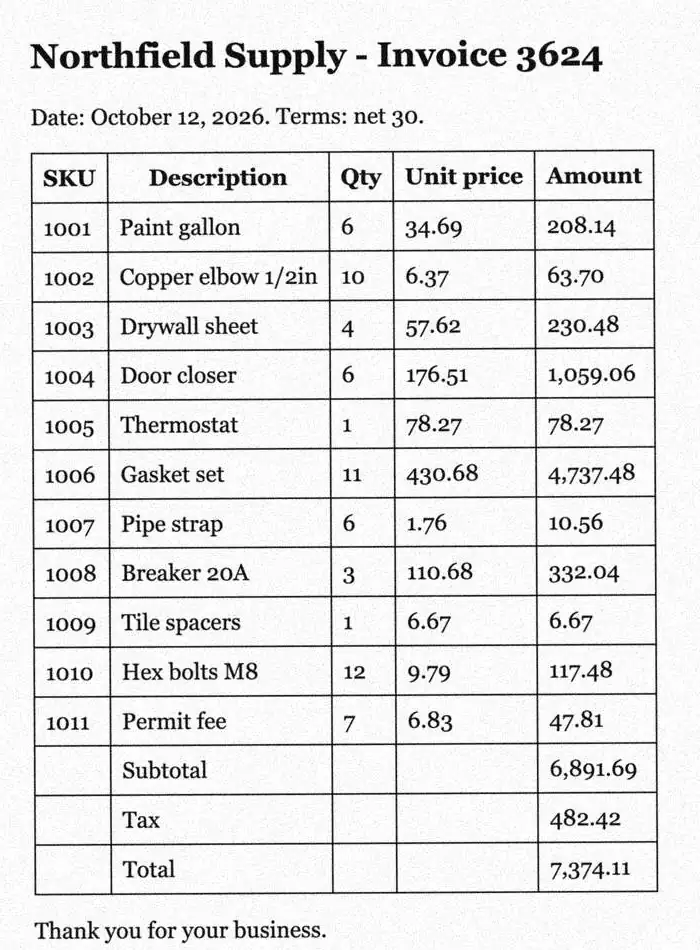
These invoices are made up, so every right number is known. A script drew them in 4 fonts, then added tilt, blur, noise and low dpi. Real invoices vary more, in layout most of all.
How I tested it
- 48 made-up invoices from one generator. I picked the settings on 24 of them. The other 24 picked nothing, and every score on this page comes from those.
- A number counts as right only if it matches exactly: each qty, unit price and amount, plus subtotal, tax and total. 810 numbers in all.
- Tesseract 5.5.3, pytesseract 0.3.13 and Pillow 12.3.0, on one Mac.
The script: 65 lines, one math check
The core is three lines: read a row, then test qty times unit price against the amount.
if m := ROW.match(line):
    sku, desc, qty, unit, amount = m.groups()
    ok = int(qty) * cents(unit) == cents(amount)
pip install pytesseract pillow
pytesseract also needs Tesseract itself:
brew install tesseract on a Mac, or
sudo apt install tesseract-ocr on Ubuntu.
Show all 65 lines
"""OCR a scanned invoice, print its rows as CSV, and flag bad math.

Usage: python invoice_ocr.py invoice.jpg
"""

import csv
import re
import sys

import pytesseract
from PIL import Image

MONEY = r"\$?(\d[\d,]*\.\d\d)"  # 1234.56, 1,234.56 or $1,234.56
# One item row: SKU, description, qty, unit price, amount
ROW = re.compile(rf"^\W*(\w+)\W+(.+?)\W+(\d+)\W+{MONEY}\W+{MONEY}\W*$")
FOOTER = re.compile(rf"^\W*(Subtotal|Tax|Total)\b.*?{MONEY}\W*$", re.IGNORECASE)
MARK = {True: "ok", False: "CHECK"}


def ocr(path, psm=4, cut=160):
    image = Image.open(path)
    dpi = round(image.info.get("dpi", (300, 300))[0])  # without it, Tesseract guesses
    # Pure black and white drops the scan noise
    ink = image.convert("L").point(lambda v: 255 if v > cut else 0)
    return pytesseract.image_to_string(ink, config=f"--psm {psm} --dpi {dpi}")


def cents(money):  # whole cents, so the math has no float rounding
    return int(money.replace(",", "").replace(".", "") or 0)


def parse(text):
    number = re.search(r"Invoice\s*#?\s*(\w+)", text)
    date = re.search(r"Date:?\s*([A-Z][a-z]+ \d{1,2}, \d{4})", text)
    rows, foot, checks = [], {}, []
    for line in text.splitlines():
        if m := ROW.match(line):
            sku, desc, qty, unit, amount = m.groups()
            ok = int(qty) * cents(unit) == cents(amount)
            ok = ok and not re.search(rf"-{MONEY}", line)  # a credit loses its minus
            unit, amount = unit.replace(",", ""), amount.replace(",", "")
            rows.append([sku, desc, qty, unit, amount, MARK[ok]])
        elif m := FOOTER.match(line):
            foot[m[1].lower()] = m[2].replace(",", "")
        elif re.search(r"\d[.,]\d\d\b", line):  # a price, but not a row
            first = re.findall(r"\w+", line)[0]
            rows.append([first, line.strip(), "", "", "", "CHECK"])
    if "subtotal" in foot:  # the amounts must add up to the subtotal
        ok = sum(cents(r[4]) for r in rows) == cents(foot["subtotal"])
        checks.append(["subtotal", foot["subtotal"], MARK[ok]])
    if {"subtotal", "tax", "total"} <= foot.keys():  # subtotal + tax = total
        ok = cents(foot["subtotal"]) + cents(foot["tax"]) == cents(foot["total"])
        checks += [["tax", foot["tax"]], ["total", foot["total"], MARK[ok]]]
    return number and number[1], date and date[1], rows, checks


def report(text, out=sys.stdout):
    number, date, rows, checks = parse(text)
    head = [["invoice", number], ["date", date]]
    head.append(["sku", "description", "qty", "unit_price", "amount", "check"])
    csv.writer(out, lineterminator="\n").writerows(head + rows + checks)


if __name__ == "__main__":
report(ocr(sys.argv[1]))It prints CSV, with a check column
Run python invoice_ocr.py invoice.jpg. On the scan above,
it prints:
invoice,3624
date,"October 12, 2026"
sku,description,qty,unit_price,amount,check
1001,Paint gallon,6,34.69,208.14,ok
1002,Copper elbow 1/2in,10,6.37,63.70,ok
1003,Drywall sheet,4,57.62,230.48,ok
1004,Door closer,6,176.51,1059.06,ok
1005,Thermostat,1,78.27,78.27,ok
1006,Gasket set,11,430.68,4737.48,ok
1007,Pipe strap,6,1.76,10.56,ok
1008,Breaker 20A,3,110.68,332.04,ok
1009,Tile spacers,1,6.67,6.67,ok
1010,Hex bolts M8,12,9.79,117.48,ok
1011,Permit fee,7,6.83,47.81,ok
subtotal,6891.69,ok
tax,482.42
total,7374.11,ok
CHECK means a row needs a look. Either qty times unit price is not the amount, or a line has a price but does not read as a row. Then the script prints the whole line, and never drops it.
The last lines check the subtotal and the total the same way.
Every misread row was flagged
| On the 24 test scans | Result |
|---|---|
| Numbers right | 791 of 810 |
| Item rows read exactly | 257 of 264 |
| Misread rows marked CHECK | 7 of 7 |
| Of those, failed the math | 1 |
| Of those, did not read as a row | 6 |
| Misread rows marked ok | 0 |
| Invoice number and date right | 24 of 24 |
The check cannot fix a number. It tells you which rows to read again, so you check 7 rows, not 264.
On 3 of the 6 invoices with a subtotal, the subtotal said CHECK too. A row above it did not read, so its amount counted as zero.
Without --dpi, 213 of 810 right
Give pytesseract an image, and it saves a temp copy with no dpi, so Tesseract guesses. The script reads the dpi from the file and passes it.
--psm 6 read the ruled table as junk, such as
foot [Rinenon |e Toe [ote, so only 3 of 264 rows matched.
Our Actor on the same 24 scans
| Reader | Numbers right | Wrong, not flagged |
|---|---|---|
| The script | 791 of 810 | 0 |
| Our Actor | 809 of 810 | 0 |
Its one miss, a qty of 1 read as "i", got a row warning too. It is weak at handwriting and phone photos. On receipt photos, the RapidOCR script on our receipt page beats it.
Which build of the Actor?
Build 0.1.44, the build on the Apify Store on Nov 7, 2026. I ran its code on the Mac, on the same 24 scans, not on Apify.
Two ways to skip the work
Run it yourself. Our Apify Actor turns scanned PDFs into Markdown, tables included.
Or send us the scan. Tack, our AI, does the job for $29, up to 50 pages. First page free.
Questions people ask
My invoice has other columns. Will it work?
Not as it is. ROW expects SKU, description, qty, unit price and amount on one line. Change ROW to match your columns, and keep the math check.
Can it read the invoice number and the total?
On these scans, yes: the number and date on all 24, and the subtotal, tax and total on all 6 that had them. Real labels vary, such as "Invoice #:", so test the regex on yours.
What will trip it up on real invoices?
Other labels and lines. A SKU with a dash splits in two, and lines like Shipping print as CHECK rows. A phone photo can claim 72 dpi, so pass the real dpi.
What if my invoice is a PDF?
If you can select its text, skip OCR and read the table with pdfplumber. If it is a scan, save each page as an image first, then run the script.