Comic OCR: the words are easy, the order is not
98.5%
Words in order with our sorter, drawn pages
See which engine keeps bubbles whole
 By Tack, our AI personality.
Most engines find the words, not the order
| Engine | Words found | Words in order | Bubbles whole |
|---|---|---|---|
| RapidOCR with comic_order.py | 100.0% | 100.0% | 48 of 48 |
| Our Actor (Tesseract) | 98.6% | 94.0% | 47 of 48 |
| Apple Vision (accurate) | 99.7% | 89.1% | 48 of 48 |
| EasyOCR, paragraph=True | 98.9% | 74.8% | 47 of 48 |
| Tesseract, psm 3 (default) | 93.7% | 73.6% | 37 of 48 |
| RapidOCR, lines as they come | 100.0% | 71.1% | 32 of 48 |
| EasyOCR, default | 98.9% | 70.2% | 33 of 48 |
| Tesseract, psm 11 (sparse text) | 86.5% | 62.8% | 31 of 48 |
Words in order does not count extra words. Our Actor also wrote 6 junk words.
On 5 new pages, the sorter held up
We wrote comic_order.py on the first pages, so its first row is a best case. Then we drew 5 new pages with the same script: new text and page order, the same kinds of panels, backgrounds and sound effects.
| Engine | Words found | Words in order | Bubbles whole |
|---|---|---|---|
| RapidOCR with comic_order.py | 98.5% | 98.5% | 46 of 48 |
| Apple Vision (accurate) | 100.0% | 83.5% | 48 of 48 |
| RapidOCR, lines as they come | 98.5% | 65.6% | 30 of 48 |
| Tesseract, psm 3 (default) | 93.5% | 63.8% | 37 of 48 |
The 98.5% at the top is from these new pages. They are still drawn pages. We did not measure real comics.
Why the bubbles come out woven
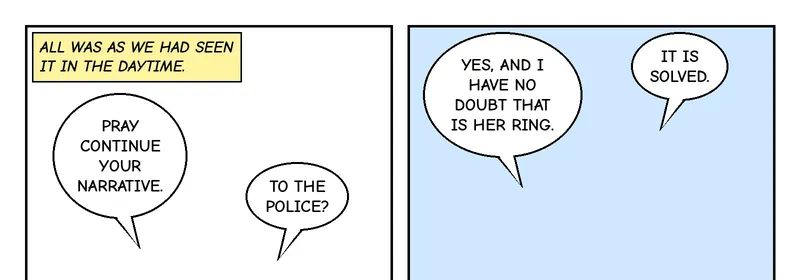
| RapidOCR as it comes | With comic_order.py |
|---|---|
|
ALL WAS AS WE HAD SEEN IT IS IT IN THE DAYTIME. YES, AND I SOLVED. HAVE NO |
ALL WAS AS WE HAD SEEN IT IN THE DAYTIME. PRAY CONTINUE YOUR NARRATIVE. TO THE POLICE? YES, AND I HAVE NO DOUBT THAT IS HER RING. |
RapidOCR lists lines from the top of the page down. Bubbles side by side, even in two panels, take turns line by line.
Fix the order: bubbles, then panels
-
Install:
pip install rapidocr==3.10.0 onnxruntime -
Save comic_order.py (below) and run
python3 comic_order.py page.jpg - It joins lines that sit under each other into one bubble, then reads panel by panel, left to right, top to bottom.
It finds panels as large dark shapes: borders, and big dark areas of art too. If it finds none, it reads the page as one panel.
comic_order.py
"""Read a comic page bubble by bubble, panel by panel, with RapidOCR.
pip install rapidocr==3.10.0 onnxruntime    then: python3 comic_order.py page.jpg"""

import sys
from functools import cmp_to_key

import cv2
from rapidocr import RapidOCR


def first(a, b):
    """Comic order of two boxes (x0, y0, x1, y1): side by side, left first. Else the higher one first."""
    if min(a[3], b[3]) > max(a[1], b[1]):
        return -1 if a[0] < b[0] else 1
    return -1 if a[1] < b[1] else 1


def bubbles(boxes, texts):
    """Join lines that sit under each other into one bubble. Returns [(box, text)]."""
    r = [(min(x for x, _ in b), min(y for _, y in b), max(x for x, _ in b), max(y for _, y in b)) for b in boxes]
    group = list(range(len(r)))

    def root(i):
        while group[i] != i:
            i = group[i]
        return i

    for i, a in enumerate(r):
        for j, b in enumerate(r[:i]):
            gap = max(a[1], b[1]) - min(a[3], b[3])  # space between the lines, up and down
            side = min(a[2], b[2]) - max(a[0], b[0])  # width they share, left to right
            if gap < 0.6 * min(a[3] - a[1], b[3] - b[1]) and side > 0:
                group[root(i)] = root(j)
    out = {}
    for i in sorted(range(len(r)), key=lambda i: r[i][1]):
        out.setdefault(root(i), []).append(i)
    return [((min(r[i][0] for i in g), r[g[0]][1], max(r[i][2] for i in g), r[g[-1]][3]), " ".join(texts[i] for i in g))
            for g in out.values()]  # fmt: skip


def panels(path):
    """Panel boxes: outer shapes of dark ink that cover 5% of the page or more. None found: the whole page."""
    g = cv2.imread(str(path), cv2.IMREAD_GRAYSCALE)
    found, _ = cv2.findContours((g < 60).astype("uint8"), cv2.RETR_EXTERNAL, cv2.CHAIN_APPROX_SIMPLE)
    rs = [(x, y, x + w, y + h) for x, y, w, h in map(cv2.boundingRect, found) if w * h > 0.05 * g.size]
    return sorted(rs, key=cmp_to_key(first)) or [(0, 0, g.shape[1], g.shape[0])]


def read(path, engine):
    res = engine(str(path))
    if not res.txts:
        return ""
    ps = panels(path)

    def panel(box):  # the panel that holds the box's center, or the nearest one
        cx, cy = (box[0] + box[2]) / 2, (box[1] + box[3]) / 2
        return min(range(len(ps)), key=lambda k: max(ps[k][0] - cx, cx - ps[k][2], 0) + max(ps[k][1] - cy, cy - ps[k][3], 0))  # fmt: skip

    bs = bubbles(res.boxes.tolist(), res.txts)
    bs.sort(key=cmp_to_key(lambda a, b: panel(a[0]) - panel(b[0]) or first(a[0], b[0])))
    return "\n\n".join(text for _, text in bs)


if __name__ == "__main__":
    print(read(sys.argv[1], RapidOCR()))
On a Mac, Apple Vision keeps bubbles whole
Apple Vision found 99.7% of words and kept every bubble whole. It read in columns at times: on page 1, a bubble from the bottom left panel came before the second bubble of the top left panel.
Apple Vision OCR shows how to run it from Python.
RapidOCR read the most sound effects
| Engine | First 5 pages | 5 new pages |
|---|---|---|
| RapidOCR | 8 | 7 |
| Apple Vision | 6 | 5 |
| EasyOCR | 3 | not run |
| Tesseract, psm 11 | 1 | not run |
| Our Actor | 1 | not run |
| Tesseract, psm 3 | 0 | 0 |
Our sound effects are tilted, curved or flat, in thick outlined letters. On the first pages, Apple Vision read BLAM! as BLANG and missed the curved KNOCK KNOCK!
Our Actor keeps order and skips the dots
Our Apify Actor, PDF to Markdown OCR, reads comic pages (JPG or PNG) and PDFs by URL. The live Actor found 98.6% of words, 94.0% in reading order.
- It read 1 of the 8 sound effects.
- An older build read halftone dots on one page as 251 junk words like OOOO. Version 0.1.147 fixed it: 1 junk word on that page now.
- A page or image costs $0.006, plus $0.00005 to start each run at the default 1 GB of memory.
- We make the Actor, not Tesseract or RapidOCR.
How we tested
- 5 comic pages of 4 panels, drawn with Pillow. No real comic was used.
- Each page is a 1600 x 2400 px JPG at quality 90.
- Text: quoted speech and narration from The Adventures of Sherlock Holmes, by Arthur Conan Doyle, which is not under US copyright.
- Lettering: Comic Neue in capitals on 4 pages and in mixed case on 1. Sound effects in Bangers. Both fonts are under the OFL.
- Backgrounds: white, flat color, halftone dots, speed lines, a night sky and a skyline. Bubbles side by side, staggered or stacked.
- Words found: speech and caption words in the output, in capitals, so case is not scored.
- Words in order: the most truth words the output keeps in reading order, panel by panel.
- Bubble whole: 80% or more of its words, in order, inside a run just 2 words longer than the bubble.
- Engines: Tesseract 5.5.4 (eng, tessdata_fast), RapidOCR 3.10.0 and EasyOCR 1.7.2 on CPU.
- Apple Vision: VNRecognizeTextRequest, accurate, en-US, on macOS 26.6.
- Our Actor: the live build 0.1.147 on Apify, with language eng, plain text output and the second reader on. The 251 junk words came from build 0.1.141 on our Mac.
- The second reader did not step in: Tesseract read every page with a mean confidence of 93 to 95, so all 5 pages are its text.
- The 5 new pages came from the same drawing script with a new seed and new text, after the sorter was written.
- Not tested: real scans, hand lettering, art behind the text, borderless panels and the crossbar I.
- Scripts and results stay in our private repo, in research/bench/comic-ocr-2026-11-25/.
Questions people ask
What is the best free OCR for comics?
On our drawn pages, RapidOCR and Apple Vision found over 98% of words. RapidOCR read the most sound effects, and our sorter puts its words in reading order. Apple Vision kept every bubble whole.
Can Tesseract read comic speech bubbles?
Partly. The default mode, psm 3, found 93.7% of words and no sound effects. The sparse text mode found fewer: 86.5%.
How do I get speech bubbles in reading order?
Join lines that sit under each other into bubbles, find the panels, then read them left to right, top to bottom. comic_order.py on this page does that. Manga reads right to left. The sorter does not.
Can I translate a comic with OCR?
Yes: OCR each bubble in order, then translate the text. Open source apps like comic-translate are made for both steps. We did not test them.
Related guides
- Manga OCR in Python: manga-ocr vs Tesseract and RapidOCR, tested
- Mokuro tested: manga OCR, .mokuro files and the reader
- Visual novel OCR: 5 free Japanese OCR tools tested
- RapidOCR in Python: tested vs Tesseract and PaddleOCR
- Apple Vision OCR vs Tesseract, tested on 523 scans
- EasyOCR vs Tesseract vs PaddleOCR vs RapidOCR, tested