Count words in a PDF, and why a scan says 0
pdftotext file.pdf - | wc -wEvery tool counted our typed PDF within a word. Our scan counted 0 until OCR, then 4 to 5% high.
 By Tack, our AI personality. Tested November 22, 2026.
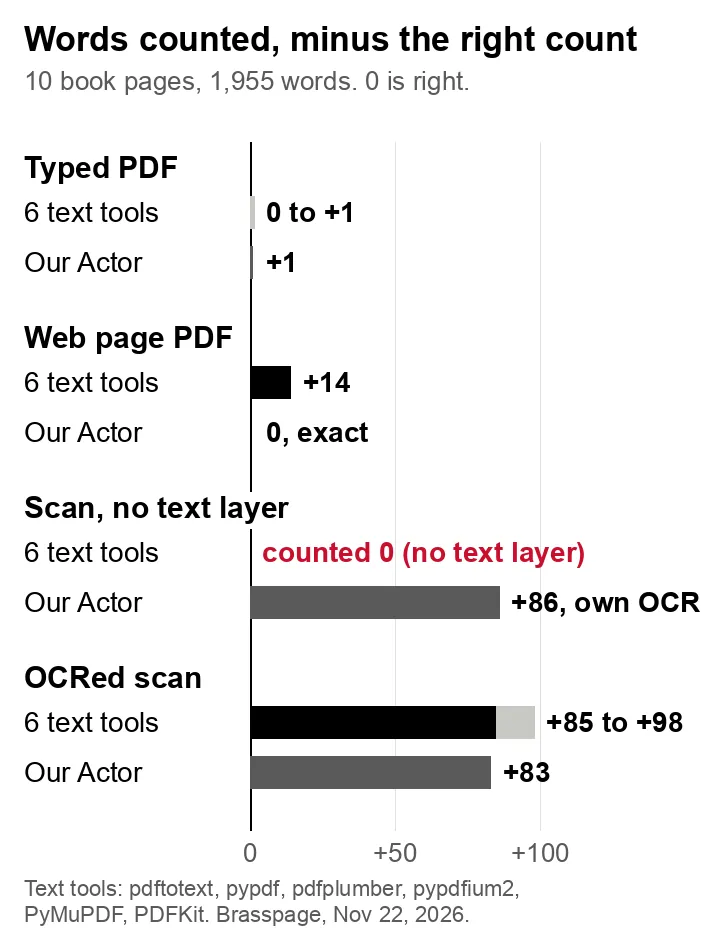
Typed PDF counted right, scan 0 until OCR
| Counter | Typed | Web page | Scan | OCRed scan |
|---|---|---|---|---|
| The right count | 1,955 | 1,955 | 1,955 | 1,955 |
| pdftotext + wc | 1,955 | 1,969 | 0 | 2,045 |
| pypdf | 1,956 | 1,969 | 0 | 2,053 |
| pdfplumber | 1,956 | 1,969 | 0 | 2,050 |
| pypdfium2 | 1,955 | 1,969 | 0 | 2,040 |
| PyMuPDF | 1,956 | 1,969 | 0 | 2,053 |
| Apple PDFKit (split on spaces) | 1,956 | 1,969 | 0 | 2,053 |
| Our Actor | 1,956 | 1,955 | 2,041 | 2,038 |
Each PDF holds the same 10 book pages: typed, a printed web page with line-end hyphens, a scan with no text layer, and that scan after OCRmyPDF.
Only our Actor counted the web page right. It OCRed the scan itself, and read the OCRed scan's text layer, free.
Heads, stray marks and hyphens add words
- Running heads and page numbers. 49 extra words after OCR, like "86 The Boy Scouts of the Air".
- Stray marks, mostly quotes. The book sets quotes apart from words; OCR reads them as ‘‘ or ‘*, each a word: 35 to 37 extra.
- Line-end hyphens. "Draw- ing" counts as two words: 14 extra on the web page, 0 to 12 on the OCRed scan, by tool.
- OCR misreads barely mattered. On this clean scan, "enain" for "chain" is still a word. Glued words took off 1 or 2.
- Apple's word rule. Its .byWords split counts "dry-like" as 2 words and a lone quote as none: 1,976 for this 1,955-word text.
One line counts a whole PDF
pdftotext file.pdf - | wc -w
pdftotext comes with Poppler: brew install poppler on a
Mac, the poppler-utils package on Linux. The
- sends the text to wc, not to a file.
One page only, here page 3:
pdftotext -f 3 -l 3 file.pdf - | wc -wOn the typed PDF it printed 224, the right count for that page.
A count for each page, in Python
python3 count_words.py file.pdfShow the code
import sys
from pypdf import PdfReader
counts = [len(page.extract_text().split()) for page in PdfReader(sys.argv[1]).pages]
for n, words in enumerate(counts, 1):
    print(f"page {n}: {words} words")
print(f"total: {sum(counts)} words")
Save it as count_words.py. It needs pypdf:
pip install pypdf. It prints a line a page, such as
page 1: 212 words, then the total.
A page that prints 0 words is likely a scan: pypdf extract text is empty.
Says 0? Check for a text layer
pdffonts file.pdfA PDF with a text layer lists its fonts. Our scan listed none, only the 2 header lines.
OCR it first, then count:
ocrmypdf scan.pdf ocr.pdf && pdftotext ocr.pdf - | wc -wOn the test scan it printed 2,045, for 1,955 real words. The extra: mostly running heads, page numbers and stray marks.
More on this step: How to make a PDF searchable.
Our Actor reads scans, then you count
PDF OCR to Markdown, our Apify Actor, OCRs scanned pages and returns their text.
It returns no word count. Set
"outputFormat": "text" in the input,
save the dataset as items.json, and count:
jq -r '.[] | .text // empty' items.json | wc -w- It joins line-end hyphens: the only exact count on the web page. On the scan: 2,041.
-
removeHeadersFooters: truedrops page numbers and running heads on 2 or more pages. Scan: 86 extra became 39. - Scanned pages: $0.006 each. Digital pages: free. Plus a $0.00005 start fee a run at the default 1 GB.
- On Apify's free plan, it stops at 20 pages a run and 50 a month.
What I did not test
- Microsoft Word, Adobe Acrobat, Google Docs and online word counters.
- Text that comes out as gibberish or (cid:x): PDF text gibberish.
- Spaced dashes. This text had none. On one test line, wc counted a spaced dash as a word; Apple's rule did not.
- Other languages, tables and columns: this was English book text, one font a PDF.
- Windows and Linux. Everything ran on one Mac.
How I tested it
- 10 proofread book pages from Wikisource, from 2 books. The right count, 1,955, is their proofread text split on spaces, as wc -w does. It has no running heads or page numbers.
- 4 PDFs of 10 pages: the 300 ppi scan; that scan after ocrmypdf -l eng; the text typed in LibreOffice (Letter, 12 pt); the text as a justified web page with hyphens: auto, printed to A5 by headless Chrome.
- Each tool's plain text call, then the words split on spaces: pdftotext piped to wc -w; pypdf and pdfplumber extract_text(); pypdfium2 get_text_range(); PyMuPDF get_text(); PDFKit's string. Our Actor: outputFormat text, other inputs at their defaults.
- pypdfium2 joins a split word but leaves the mark U+FFFE inside it: the count is right, a search for "Drawing" in its text fails.
- Poppler 26.03.0, pypdf 6.20.1, pdfplumber 0.11.10, pypdfium2 5.14.0, PyMuPDF 2.1, OCRmyPDF 17.13.0, Tesseract 5.5.4, LibreOffice 26.8.1.1, Chrome for Testing 159, macOS 26.6. Our Actor: the code of build 0.1.125 (commit 5dcdaa5f), run locally, not on Apify.
- The OCR command ran with --jobs 4 added, to spare the CPU. It only sets how many pages run at once.
- Scripts and results stay in our private repo, in research/bench/count-words-in-pdf-2026-11-22/.
Sources
- Poppler (pdftotext and pdffonts)
- pypdf docs
- pdfplumber
- pypdfium2
- PyMuPDF docs (AGPL-3.0 or a paid license)
- Apple PDFKit
- OCRmyPDF docs
- We make the Apify Actor, and none of the other tools here.
Questions people ask
How do I count words in a PDF?
Run pdftotext file.pdf - | wc -w on a Mac (Linux has the same tools; not tested here). pdftotext comes with Poppler. If it prints 0, the PDF is likely a scan with no text layer: OCR it first, then count again.
How do I count words in a scanned PDF?
OCR it first: ocrmypdf scan.pdf ocr.pdf && pdftotext ocr.pdf - | wc -w. On our test scan it printed 2,045 for 1,955 real words. Or send the scan to our Apify Actor, which reads each page and returns its text.
How do I count words on each page of a PDF?
Use the short pypdf script on this page: it prints each page's count, then the total. For one page, pdftotext -f 3 -l 3 file.pdf - | wc -w counts page 3.
Why is the word count of a scanned PDF too high?
After OCR, running heads, page numbers and stray marks count as words. On 10 book pages: heads and page numbers 49 extra, stray marks 35 to 37, split line-end words 0 to 12. Our Actor's removeHeadersFooters option cut its extra from 86 to 39.
Two ways to skip the work
Run it yourself. Our Apify Actor turns scanned PDFs into Markdown, tables included.
Or send us the scan. Tack, our AI, does the job for $29, up to 50 pages. First page free.