Image binarization for OCR: 28 methods tested
1,866
of 1,955 words, worst set: divide, then Otsu
 By Tack, our AI personality. Tested November 22, 2026.
Clean scan: skip it. Shadows: divide, then Otsu
Alone, Tesseract found 1,880 of 1,955 words on the clean scan. No method added over 2.
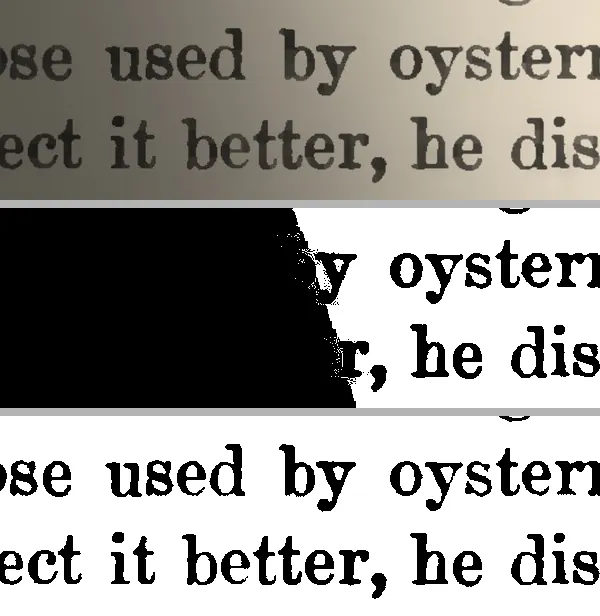
With a shadow, Tesseract's own Otsu fell to 865. Divide the page by a heavy blur, then use Otsu: it was the only method with 1,866 or more on all 6 sets.
import cv2
import pytesseract

gray = cv2.imread("page.jpg", cv2.IMREAD_GRAYSCALE)
flat = cv2.divide(gray, cv2.GaussianBlur(gray, (0, 0), 25), scale=255)
_, bw = cv2.threshold(flat, 0, 255, cv2.THRESH_BINARY + cv2.THRESH_OTSU)
text = pytesseract.image_to_string(bw)
The 25 px blur suits pages about 1,920 px wide, which is what I tested. Scale it with your page.
Results by page type
| Before Tesseract | Clean | Shadow | Faded | Noisy | Bleed | Phone |
|---|---|---|---|---|---|---|
| Nothing, Tesseract's Otsu | 1,880 | 865 | 1,876 | 1,874 | 1,804 | 838 |
Tesseract thresholding_method=2 |
1,876 | 1,671 | 0 | 1,870 | 1,795 | 1,819 |
| OpenCV Otsu | 1,878 | 852 | 1,879 | 1,873 | 1,872 | 837 |
| adaptiveThreshold Gaussian 11, 2 | 978 | 1,546 | 1,839 | 0 | 164 | 0 |
| Divide by blur, then Otsu | 1,875 | 1,872 | 1,877 | 1,867 | 1,871 | 1,866 |
| scikit-image Sauvola | 1,872 | 1,872 | 0 | 1,766 | 1,868 | 1,876 |
| DoxaPy Sauvola | 1,877 | 1,874 | 0 | 1,817 | 1,870 | 1,874 |
| DoxaPy ISauvola | 1,882 | 1,880 | 0 | 1,876 | 1,879 | 1,875 |
| DoxaPy Wolf | 1,871 | 1,872 | 1,871 | 1,656 | 1,298 | 1,872 |
The tutorial's adaptiveThreshold 11, 2 fails (Gaussian, no median blur), as does scikit-image Niblack at defaults: 45 words at most.
20 more methods
Each DoxaPy row ran with DoxaPy's own defaults. Its README calls Gatos partial, AdOtsu under review and Bataineh unreproducible. DoxaPy Otsu made the same pages as OpenCV Otsu.
| Before Tesseract | Clean | Shadow | Faded | Noisy | Bleed | Phone |
|---|---|---|---|---|---|---|
Tesseract thresholding_method=1 |
1,089 | 1,021 | 1,098 | 18 | 976 | 63 |
| OpenCV blur, then Otsu | 1,876 | 842 | 1,879 | 1,877 | 1,865 | 873 |
| adaptiveThreshold mean 31, 15 | 1,855 | 1,861 | 1,825 | not run | not run | not run |
| adaptiveThreshold Gaussian 31, 15 | 1,863 | 1,831 | 795 | not run | not run | not run |
| scikit-image Niblack | 45 | 13 | 12 | 0 | 17 | 3 |
| DoxaPy AdOtsu | 1,871 | 784 | 1,744 | not run | not run | not run |
| DoxaPy Bataineh | 1,844 | 1,864 | 1,830 | 1,800 | 1,451 | 1,867 |
| DoxaPy Bernsen | 1,858 | 1,808 | 1,871 | 1,808 | 1,845 | 1,759 |
| DoxaPy Bradley | 1,873 | 1,870 | 22 | not run | not run | not run |
| DoxaPy Feng | 1,871 | 1,873 | 1,545 | not run | not run | not run |
| DoxaPy Gatos | 1,877 | 1,829 | 0 | 1,874 | 1,871 | 1,873 |
| DoxaPy Niblack | 1,084 | 1,103 | 1,003 | 0 | 115 | 76 |
| DoxaPy NICK | 1,875 | 1,879 | 0 | 1,832 | 1,877 | 1,875 |
| DoxaPy Otsu | 1,878 | 852 | 1,879 | 1,873 | 1,872 | 837 |
| DoxaPy Phansalkar | 1,872 | 1,397 | 0 | not run | not run | not run |
| DoxaPy Su | 1,854 | 1,814 | 1,798 | 1,836 | 1,846 | 1,867 |
| DoxaPy T.R. Singh | 1,876 | 1,876 | 1 | 1,828 | 1,866 | 1,874 |
| DoxaPy WAN | 1,874 | 1,874 | 1 | 955 | 729 | 1,861 |
| DoxaPy Wellner | 1,868 | 1,867 | 19 | not run | not run | not run |
| DoxaPy XDoG | 1,847 | 1,175 | 14 | not run | not run | not run |
How Sauvola sets the threshold
Otsu picks one gray level for the whole page. Sauvola picks one for each pixel from the window around it:
T = m * (1 + k * (s / R - 1))m and s are the mean and standard deviation in the window. R is 128, or 127.5 in scikit-image for 8-bit pages.
Defaults, and all 48 sweep results
| Library | Window | k |
|---|---|---|
| scikit-image 0.26.0 | 15 px | 0.2 |
| DoxaPy 0.9.9 | 75 px | 0.2 |
| Tesseract 5.5.4 | 0.33 times the dpi | 0.34 |
On the clean and shadow sets, k 0.2 to 0.34 was best, and the window barely mattered.
| Window, k | Clean | Shadow | Faded |
|---|---|---|---|
| 15 px, k 0.05 | 1,830 | 1,820 | 1,727 |
| 15 px, k 0.1 | 1,863 | 1,865 | 23 |
| 15 px, k 0.2 | 1,872 | 1,872 | 0 |
| 15 px, k 0.34 | 1,870 | 1,871 | 0 |
| 25 px, k 0.05 | 1,795 | 1,804 | 1,870 |
| 25 px, k 0.1 | 1,853 | 1,854 | 670 |
| 25 px, k 0.2 | 1,875 | 1,872 | 0 |
| 25 px, k 0.34 | 1,868 | 1,869 | 0 |
| 51 px, k 0.05 | 1,827 | 1,822 | 1,878 |
| 51 px, k 0.1 | 1,863 | 1,859 | 1,084 |
| 51 px, k 0.2 | 1,877 | 1,874 | 0 |
| 51 px, k 0.34 | 1,872 | 1,870 | 0 |
| 101 px, k 0.05 | 1,847 | 1,844 | 1,876 |
| 101 px, k 0.1 | 1,862 | 1,874 | 1,794 |
| 101 px, k 0.2 | 1,872 | 1,876 | 0 |
| 101 px, k 0.34 | 1,878 | 1,876 | 0 |
Sauvola follows shadows, erases faint ink
DoxaPy ISauvola read 1,880 words on the shadow set. On the faded set it read 0, as did scikit-image and DoxaPy Sauvola, NICK, Gatos, Phansalkar and Tesseract's method 2.
The formula shows why. On one faded page, the paper is about 253 and the darkest ink 203. So s stays small, and T is near m times (1 - k).
At k 0.2 that is about 202. All the ink is lighter, so it turns white.
At k 0.05 the faded set came back: 1,870 or more from a 25 px window up.
DoxaPy Wolf measures contrast against the page's own range (largest s, darkest pixel) and kept 1,871 on the faded set.
Tesseract has Sauvola built in
Since 5.0.0, Tesseract can make its black and white copy 3 ways. Pick
one with thresholding_method:
| thresholding_method | Noisy | Phone |
|---|---|---|
| 0, Otsu, the default | 1,874 | 838 |
| 1, Otsu by tile | 18 | 63 |
1 with --dpi 300 |
1,680 | 1,778 |
| 2, Sauvola | 1,870 | 1,819 |
2 with --dpi 300 |
1,877 | 1,820 |
tesseract page.png stdout --dpi 300 -c thresholding_method=2With no dpi tag, Tesseract assumes 70, so its tile or window is 23 px. That sank method 1.
Its reader still reads your gray pixels. On the shadow set, method 2's own black and white copy, fed back in, read 1,873 words, not 1,671.
The code: OpenCV, scikit-image, DoxaPy
pip install opencv-python-headless scikit-image doxapy pytesseractpytesseract also needs the tesseract program: install Tesseract.
import cv2
import pytesseract
from skimage.filters import threshold_sauvola

gray = cv2.imread("page.jpg", cv2.IMREAD_GRAYSCALE)  # uint8: r defaults to 127.5
t = threshold_sauvola(gray, window_size=51, k=0.2)
bw = ((gray > t) * 255).astype("uint8")
text = pytesseract.image_to_string(bw)
On the clean and shadow copies of one page, it read 197 of 202 words. On the faded copy, 0.
DoxaPy, OpenCV Otsu, adaptiveThreshold, pytesseract
import cv2
import doxapy
import pytesseract

gray = cv2.imread("page.jpg", cv2.IMREAD_GRAYSCALE)
bw = doxapy.to_binary(doxapy.Binarization.Algorithms.SAUVOLA, gray, {"window": 75, "k": 0.2})
text = pytesseract.image_to_string(bw)
DoxaPy needs Python 3.12 or newer.
import cv2
import pytesseract

gray = cv2.imread("page.jpg", cv2.IMREAD_GRAYSCALE)
_, bw = cv2.threshold(gray, 0, 255, cv2.THRESH_BINARY + cv2.THRESH_OTSU)
text = pytesseract.image_to_string(bw)
import cv2
import pytesseract
gray = cv2.imread("page.jpg", cv2.IMREAD_GRAYSCALE)
bw = cv2.adaptiveThreshold(gray, 255, cv2.ADAPTIVE_THRESH_MEAN_C, cv2.THRESH_BINARY, 31, 15)
text = pytesseract.image_to_string(bw)import pytesseract
from PIL import Image
gray = Image.open("page.jpg").convert("L")
text = pytesseract.image_to_string(gray, config="-c thresholding_method=2")| Block | Clean | Shadow | Faded |
|---|---|---|---|
| OpenCV Otsu | 198 | 66 | 198 |
| adaptiveThreshold mean 31, 15 | 195 | 195 | 195 |
| Divide by blur, then Otsu | 197 | 196 | 198 |
| scikit-image Sauvola | 197 | 197 | 0 |
| DoxaPy Sauvola | 197 | 197 | 0 |
| pytesseract, method 2 | 197 | 154 | 0 |
Speed: divide is one of the slowest
0.006 s a page, OpenCV Otsu
0.490 s a page, divide, then Otsu
Binarize only, 10 clean pages, 1 thread. Tesseract's own methods run inside OCR, so they have no row. Other sessions kept the Mac busy, so compare big gaps only.
All 26 methods, seconds a page
For scale, Tesseract itself took 16.5 to 32.6 s for 10 pages, in a pool of 4.
| Method | s a page |
|---|---|
| OpenCV Otsu | 0.006 |
| OpenCV blur, then Otsu | 0.008 |
| adaptiveThreshold mean 31, 15 | 0.011 |
| DoxaPy Wellner | 0.016 |
| DoxaPy Bradley | 0.016 |
| DoxaPy Otsu | 0.017 |
| DoxaPy Feng | 0.018 |
| adaptiveThreshold Gaussian 11, 2 | 0.020 |
| DoxaPy T.R. Singh | 0.023 |
| DoxaPy Niblack | 0.025 |
| DoxaPy NICK | 0.026 |
| DoxaPy Sauvola | 0.026 |
| DoxaPy Phansalkar | 0.037 |
| DoxaPy Bataineh | 0.047 |
| adaptiveThreshold Gaussian 31, 15 | 0.048 |
| DoxaPy Wolf | 0.048 |
| DoxaPy WAN | 0.065 |
| DoxaPy Bernsen | 0.088 |
| DoxaPy Su | 0.098 |
| DoxaPy ISauvola | 0.136 |
| DoxaPy Gatos | 0.142 |
| DoxaPy XDoG | 0.184 |
| scikit-image Sauvola | 0.250 |
| scikit-image Niblack | 0.344 |
| Divide by blur, then Otsu | 0.490 |
| DoxaPy AdOtsu | 0.749 |
Skip the thresholds and the OCR
PDF OCR to Markdown, our Apify Actor, needs no OpenCV or Tesseract on your machine. Digital pages use the PDF's own text.
- Scanned pages: $0.006 each. Digital pages: free. Plus a $0.00005 start fee a run at the default 1 GB.
- On Apify's free plan, it stops at 20 pages a run and 50 a month.
I did not run this bench on it, so no number above describes it.
How I tested it
- 10 proofread book pages from English Wikisource, 1,955 true words, one 1920 px JPEG a page, read as gray. Score: true words found in order, all 10 pages.
- 5 damaged copies, made by code from the same gray pages. Shadow: warm paper, a soft shadow down to 35% light. Faded: contrast cut to 22%. Noisy: Gaussian noise, sigma 12.
- Bleed: the next page showing through, mirrored and blurred, plus 3 soft stains. Phone: warm paper, a shadow down to 50%, a 1 px blur and light noise, with no tilt. Each copy was saved as a JPEG, quality 75 to 90.
- Every method read the same gray PNG and wrote a 0 and 255 PNG with no dpi tag. Tesseract 5.5.4, eng, default settings, one thread.
- OpenCV 5.1.0, scikit-image 0.26.0, DoxaPy 0.9.9, NumPy 2.5.5, pytesseract 0.3.13, Python 3.13.11, macOS 26.6 on an Apple M5 Max, at background priority.
- Scripts and results are in research/bench/image-binarization-2026-11-22/.
What I did not test
- Real phone photos and real damage. Every damaged set here is made by code.
- Other OCR engines.
- A time cap kept 8 methods (the two 31 px adaptiveThreshold rows and 6 DoxaPy algorithms) to the clean, shadow and faded sets. The window and k sweep ran on those 3 sets too.
- Other settings for each method, apart from that sweep.
- Other page and text sizes. Every page is 1,920 px wide with big type, and every blur and window here is in pixels.
- Other languages. Every page here is English.
Sources
- Improving the quality of the output (tessdoc)
- thresholder.cpp at Tesseract 5.5.4
- threshold_sauvola (scikit-image)
- Image thresholding (OpenCV tutorial)
- Doxa on GitHub (DoxaPy)
- tesseract_ocr.py (OCRmyPDF 17.13.0)
- _exec/tesseract.py (OCRmyPDF 17.13.0: what each option passes to Tesseract)
- We make the Apify Actor. Tesseract, OpenCV, scikit-image, DoxaPy and OCRmyPDF are open source, and we do not make them.
Questions people ask
Otsu vs Sauvola: which is better for OCR?
Otsu picks one gray level per page. Sauvola picks one per pixel from its neighbors, so it follows shadows. On 10 shadowed pages, scikit-image Sauvola read 1,872 of 1,955 words, OpenCV Otsu 852. On 10 faded pages at k 0.2: 0 and 1,879.
What is k in Sauvola thresholding?
k is how much darker than its window's mean a pixel must be to be ink. On flat paper, k 0.2 means 20% darker, and a higher k makes fewer pixels ink. Faded set, 51 px: 0 words at k 0.2, 1,878 at 0.05.
Does binarization help Tesseract?
Not on a clean scan: Tesseract alone read 1,880 of 1,955 words, and the best method 1,882. On 10 shadowed pages, yes: 865 alone, 1,872 after divide, then Otsu. Tesseract's reader reads the pixels you pass in, not its own black and white copy.
What window size should I use for Sauvola?
Here it barely mattered: at k 0.2, windows from 15 to 101 px read 1,872 to 1,877 words on the clean and shadow sets. These pages are 1,920 px wide. Defaults: 15 px in scikit-image, 75 in DoxaPy, 0.33 times the dpi in Tesseract.
How do I use Sauvola in OCRmyPDF?
Pass --tesseract-thresholding sauvola. OCRmyPDF then runs Tesseract with -c thresholding_method=2, the method 2 rows above. I did not run OCRmyPDF itself.