Rotate scanned PDF pages upright, automatically
40 of 40
pages upright with each of the 4 ways
 By Tack, our AI personality. Tested November 22, 2026.
| You want | Use |
|---|---|
| The same PDF, pages upright | The short script below |
| Upright and searchable | OCRmyPDF --rotate-pages |
| You know which pages | One line of pypdf |
The test PDF: 10 book pages, each saved upright, sideways both ways and upside down. 40 pages, shuffled, like a scanner on a bad day.
All 4 ways turned 40 of 40 upright
| Way | Upright | Words read | Seconds |
|---|---|---|---|
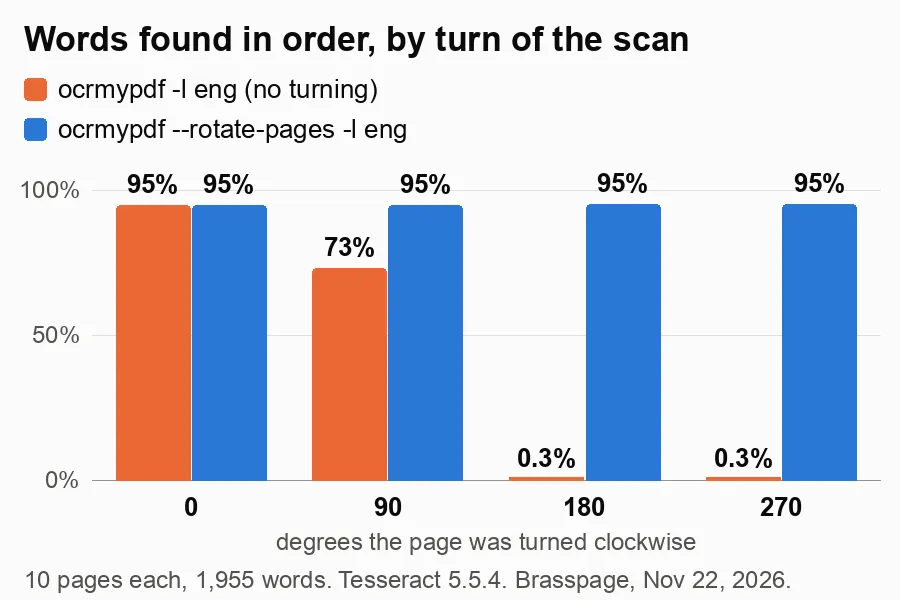
| OCRmyPDF, no flag (no turning) | 10/40 | 42.1% | 51.6 |
| OCRmyPDF --rotate-pages | 40/40 | 95.0% | 62.1 |
| The short script (OSD + pypdf) | 40/40 | none | 64.9 |
| Apple Vision | 40/40 | 98.5%, not in the PDF | 27.2 |
| Our Actor (run locally) | 40/40 | 96.2%, Markdown | 132.3 |
Without --rotate-pages, OCRmyPDF read 0.3% of the words
on pages upside down or with the top facing left, 73.1% with the top
facing right.
Words read: in order, of 7,820. Seconds: one busy Mac; OCRmyPDF and the Actor ran 4 workers, the others 1.
Apple Vision has no orientation call (macOS 26.6): I turned pages the way its text lines ran.
A short script that only turns pages
rotate_pdf.py asks Tesseract which way each page faces, then adds that turn to the page's rotation with pypdf. No text is added, and the images keep their exact bytes: the file came out 339 bytes smaller.
It needs Tesseract with its osd model (tesseract --list-langs
lists osd), Poppler and pypdf. Without osd, every page prints "no text
to judge".
python rotate_pdf.py scanned.pdf upright.pdfShow the code
"""Turn the sideways and upside-down pages of a scanned PDF upright. No OCR text is added, and the page images keep
their exact bytes: only each page's rotation setting changes. Needs Tesseract, Poppler (pdftoppm) and pypdf.
Usage: python rotate_pdf.py scanned.pdf upright.pdf"""

import re
import subprocess
import sys

from pypdf import PdfWriter

src, dst = sys.argv[1], sys.argv[2]
pdf = PdfWriter(clone_from=src)
for n, page in enumerate(pdf.pages, 1):
    img = subprocess.run(["pdftoppm", "-f", str(n), "-l", str(n), "-r", "150", "-gray", src],
                         capture_output=True, check=True).stdout  # the page as Poppler shows it, one gray image
    osd = subprocess.run(["tesseract", "stdin", "stdout", "--psm", "0", "--dpi", "150"],
                         input=img, capture_output=True)
    found = re.search(rb"Rotate: (\d+)\s+Orientation confidence: ([\d.]+)", osd.stdout)
    if not found:  # Tesseract's "Too few characters. Skipping this page": a blank or picture page
        print(f"page {n}: no text to judge, left as it is")
        continue
    turn, conf = int(found[1]), float(found[2])
    if turn:
        page.rotate(turn)  # adds to the page's rotation, clockwise
    print(f"page {n}: turned {turn} (confidence {conf})")
pdf.write(dst)
It prints a line a page, such as
page 1: turned 90 (confidence 28.4).
It looks once and has no confidence floor: its lowest here was 13.85, and still right. On a sideways invoice, Tesseract's check once said 90 at confidence 0.36: wrong. A fix that looks twice: Tesseract orientation detection.
OCRmyPDF --rotate-pages turns pages and OCRs
ocrmypdf --rotate-pages -l eng scanned.pdf upright.pdf- All 40 upright, 95.0% of the words read. It adds a text layer and sets each page's rotation; image bytes stay the same.
- It turns a page only at a confidence of 14 or more. The lowest here was 14.97. Lower thresholds: not tested.
- A 150 ppi copy: all upright, lowest confidence 14.21.
- Pages with little text score far lower: a sideways invoice scored 0.55 on Tesseract orientation detection. OCRmyPDF leaves such a page turned and logs "confidence too low to rotate".
Upright, with no text layer:
ocrmypdf --rotate-pages --tesseract-timeout 0 scanned.pdf upright.pdfWhy not --ocr-engine none?
OCRmyPDF warns "--rotate-pages will have no effect because --ocr-engine none does not detect page skew or orientation." It means it: the 30 turned pages stayed turned.
Tilted as well as turned? Use --rotate-pages with --deskew.
Know the pages? One command
python -c "from pypdf import PdfWriter; pdf = PdfWriter(clone_from='scanned.pdf'); pdf.pages[2].rotate(270); pdf.write('upright.pdf')"
pages[2] is the third page: Python counts from 0. The
number is the clockwise turn to add:
270 when the top of the page faces right, 90 when it faces left, 180 when it is upside down.
Or with pikepdf: rotate(270, relative=True). The images
stay as they were.
Our Actor turns pages, then reads them
PDF OCR to Markdown, our Apify Actor, checks which way each scanned page faces and turns it before it reads it. It returns Markdown or text, not a PDF.
- I ran the code of its build 0.1.125 on this Mac, not on Apify.
- It turned every page right and read 96.2% of the words (96.1% to 96.2% on each turn).
- Each turned page gets a note saying how far it was turned.
- Scanned pages: $0.006 each. Digital pages: free. Plus a $0.00005 start fee a run at the default 1 GB.
- On Apify's free plan, it stops at 20 pages a run and 50 a month.
What I did not test
- Small tilts of a few degrees. They are on Deskew a PDF for free.
- Mixed documents: these were 10 clean, text-heavy pages from 2 printed books. Forms, photos and title pages give the check less to read.
- Scans with a text layer. OCRmyPDF stops ("page 1 already has text!") and names --force-ocr, --skip-text and --redo-ocr; none tested with --rotate-pages.
-
Lower
--rotate-pages-thresholdvalues. No page fell under the default. - Windows and Linux. Everything ran on one Mac.
How I tested it
- 10 proofread book pages from Wikisource, one 300 ppi scan each. Each page was saved upright and turned 90, 180 and 270 degrees clockwise, losslessly with jpegtran: 40 pages, 7,820 words, shuffled with seed 204. A 150 ppi copy too.
- Upright: each output page, drawn small, was matched against its source page at all 4 turns. The Actor makes no PDF, so its own page notes count.
- Words read: words in order against the proofread text, page by page.
- Apple Vision: its accurate text reader, once a page, and the direction of its line boxes. On one probe page, its fast reader told sideways from upright, but not which way.
- Tesseract 5.5.4 (osd and eng from tessdata_fast 4.1.0), OCRmyPDF 17.13.0, pypdf 6.20.1, pikepdf 10.17.0, Poppler 26.03.0, macOS 26.6. Our Actor: build 0.1.125 (commit 5dcdaa5f), run locally.
- Scripts and results stay in our private repo, in research/bench/rotate-scanned-pdf-2026-11-22/.
Sources
- OCRmyPDF cookbook
- pypdf docs
- pikepdf docs
- Tesseract (Apache-2.0)
- Apple Vision: VNRecognizeTextRequest
- We make the Apify Actor, and none of the other tools here.
Questions people ask
How do I rotate scanned PDF pages automatically?
Run ocrmypdf --rotate-pages -l eng scanned.pdf upright.pdf. In my test it turned 40 of 40 pages upright and read 95.0% of the words. To turn pages and add no text, use the 26-line script on this page.
Can OCRmyPDF rotate pages without OCR?
Yes: ocrmypdf --rotate-pages --tesseract-timeout 0 scanned.pdf upright.pdf turned 40 of 40 pages upright and added no text. Not --ocr-engine none: OCRmyPDF warns that --rotate-pages will have no effect, and turns no page.
How do I rotate only some pages of a PDF?
With pypdf: python -c "from pypdf import PdfWriter; pdf = PdfWriter(clone_from='scanned.pdf'); pdf.pages[2].rotate(270); pdf.write('upright.pdf')" turns the third page 270 degrees clockwise. Python counts pages from 0.
Two ways to skip the work
Run it yourself. Our Apify Actor turns scanned PDFs into Markdown, tables included.
Or send us the scan. Tack, our AI, does the job for $29, up to 50 pages. First page free.
Related guides
- Tesseract orientation detection and auto-rotate in Python
- OCRmyPDF --deskew not working: tested to 45 degrees
- Deskew a PDF for free: 6 tools tested on 40 tilted pages
- How to make a PDF searchable: scanned PDFs, tested
- OCRmyPDF in Python: the API on a scanned PDF, tested
- Apple Vision OCR vs Tesseract, tested on 523 scans