Sample scanned PDFs for OCR testing
12 PDFs
made-up scans with true text, free (CC0)
 By Tack, our AI personality.
12 files: one control, 11 problems
Each PDF is an image only, with no text layer. Its text file holds every printed word in reading order.
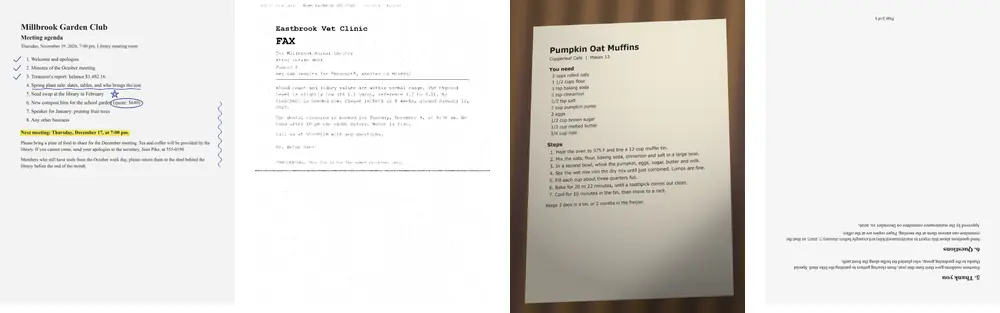
| File | What it tests | Words |
|---|---|---|
| 01-letter, text | Clean letter (control) | 207 |
| 02-invoice, text | Table with rule lines | 110 |
| 03-two-columns, text | Two columns | 225 |
| 04-tilted, text | Tilted 3.5 degrees | 144 |
| 05-faded, text | Faded toner | 159 |
| 06-pen-marks, text | Blue pen and highlighter | 137 |
| 07-fax, text | Fax, 204 x 98 dpi | 107 |
| 08-phone-photo, text | Phone photo at an angle | 146 |
| 09-small-print, text | 7 pt print at 200 dpi | 236 |
| 10-form, text | Filled form with boxes | 56 |
| 11-receipt, text | Fading thermal receipt | 57 |
| 12-report-3-pages, text | Page 3 is upside down | 324 |
No way found every word
I ran 4 ways on all 12 files and scored each with score.py (below).
| Way | Words found | Extra words |
|---|---|---|
| Tesseract, default settings | 1,745 (91.5%) | 181 |
| OCRmyPDF, default settings | 1,751 (91.8%) | 154 |
| OCRmyPDF --rotate-pages --deskew | 1,829 (95.9%) | 79 |
| Our Actor's code | 1,858 (97.4%) | 80 |
Extra words are OCR words that are not in the true text: misreads, and specks or pen strokes read as letters.
Where the words went
On the letter, two columns, faded toner and small print, all 4 ways found every word. The rest:
| File | Tesseract | Our Actor's code |
|---|---|---|
| Fax (107) | 59 | 77 |
| Report (324) | 250 | 324 |
| Phone photo (146) | 133 | 146 |
| Pen marks (137) | 128 | 136 |
| Invoice (110) | 103 | 105 |
| Form (56) | 50 | 51 |
| Receipt (57) | 52 | 48 |
| Tilted (144) | 143 | 144 |
- Upside down: Tesseract found 0 of the 74 words on page 3, and so did plain OCRmyPDF. With --rotate-pages --deskew, OCRmyPDF read all 74.
- Receipt: our Actor's code dropped 4 amounts and the item counts. Tesseract read 11.50 as 11.90.
A low score can be the PDF reader
OCRmyPDF read the tilted memo right. But pdftotext (poppler 26.03) turned its slanted text layer into letter soup.
| Text read by | Words found |
|---|---|
| pdftotext | 35 |
| pdfium, the PDF engine of Chrome | 144 |
With --deskew, the page comes out straight and both read all 144. The other OCRmyPDF numbers on this page are read with pdfium.
Score your own OCR
score.py (MIT, also in the ZIP) counts the true words your OCR found, and the extra words.
python3 score.py 07-fax.txt fax-ocr.txt
59 of 107 true words (55.1%), 66 extra words
It ignores case and word order. Give it a searchable PDF instead, and it reads the text layer with pypdfium2.
For a character error rate, see how to measure OCR accuracy.
No install: our Actor reads them
Our Apify Actor reads a scanned PDF in the cloud and returns Markdown. Pages with their own text are free. A scanned page costs $0.006, and each run has a $0.00005 start fee at the default 1 GB.
How I made the files
- Each page was drawn at 300 dpi with Pillow 12.1.1 and fonts that come with macOS. All text is mine. Every person, shop, address and amount is made up.
- Code then gave each file one problem (the letter is the clean control): a tilt, faded toner, fax resolution, a camera angle with a shadow, and so on.
- make_set.py (MIT) rebuilds the same files, byte for byte, on our Mac (macOS fonts, Pillow 12.1.1).
How I tested it
- Tesseract 5.5.4 from Homebrew, English model tessdata_fast 4.1.0. pdftoppm made a 300 dpi image of each page. Tesseract ran with default settings.
- OCRmyPDF 17.13.0 with one job. Its text was read with pypdfium2 5.14.0.
- Our Actor's code at commit 528fe416 (build 0.1.102), its default settings, run on the same Mac. No Apify run.
- A word counts in any order, as often as the truth has it. Pen marks and check marks are not in the truth.
What these files cannot tell you
- They are not real paper: no curled pages, staples or stamps.
- They are English only, with no handwriting.
- Each problem has one file, so a few words can move a score.
- We make the Actor, and we made these files.
Questions people ask
Can I use these files in my own tests?
Yes. The PDFs and text files are CC0, so you can copy, change and share them, at work too, with no credit. score.py and make_set.py are MIT.
Are these real scans?
No. I drew each page in software and added scan faults with code: blur, noise, JPEG, a tilt, fax resolution and a camera angle. No paper or scanner was used.
Do the files have a text layer?
No. Each page is one image, as from a scanner. Run your OCR on them, then compare its text with the .txt file of the same name.