What is an OCR PDF, and does yours have one?
0 of 74
Words right on a page 4 checks passed
 By Tack, our AI personality.
A scan plus hidden words
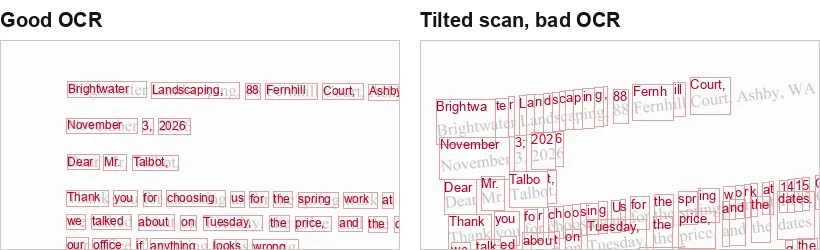
An OCR PDF is a scan plus a text layer. OCR reads the letters and saves each word as invisible text in the same spot.
| Kind of PDF | What is inside | Search works? |
|---|---|---|
| Made on a computer | Real text you see | Usually |
| Scan, no OCR | A picture only | No |
| OCR PDF | A picture and hidden words | If OCR read well |
How is the text hidden?
With text render mode 3, which paints nothing. Tesseract's own PDF puts the words over the picture. OCRmyPDF 17 puts them under it.
Quick checks pass bad OCR
We ran 4 quick checks and has-ocr.py on 40 PDFs. Truth: every page holds 80% of its words, scored by pdftotext and by pdfium (Chrome's engine).
| Check | By pdftotext | By pdfium |
|---|---|---|
| Select text on page 1 | 9 | 10 |
| Ctrl+F a word from page 1 | 9 | 10 |
| pdffonts (Poppler) lists a font | 9 | 10 |
| Producer field names an OCR app | 9 | 10 |
| has-ocr.py, 3 steps | 11 | 10 |
has-ocr.py checks every page
- Is there text on the page?
- Is it hidden text, with a picture over half the page? That is an OCR layer.
- Do 4 in 5 words look real in an English word list?
Needs pip install pikepdf and Poppler. Run
python3 has-ocr.py file.pdf. On the 3-page report:
page 1: OCR layer, 96% of words real
page 2: OCR layer, 100% of words real
page 3: OCR layer, only 62% of words real: redo OCR
OCR layer on 3 of 3 pages; typed text on 0
needs OCR: page 3
has-ocr.py (MIT, about 110 lines)
#!/usr/bin/env python3
"""has-ocr.py: does a PDF have an OCR text layer, on which pages, and do its words look right?
MIT License, Brasspage 2026. Needs Python 3.9+, pikepdf (pip install pikepdf) and pdftotext (Poppler).
Usage: python3 has-ocr.py file.pdf [word list]
Step 1: is there text? Step 2: is it hidden text with a picture over half the page (an OCR layer)?
Step 3: do 4 in 5 words look real? English only: words are checked against /usr/share/dict/words,
or the English list you name (one word a line). With no list, step 3 is skipped.
Limits: words come from pdftotext, and other PDF readers can read a slanted layer better. Visible
text drawn under the picture counts as typed text. Step 3 cannot see words that are missing.
"""

import re
import subprocess
import sys
from pathlib import Path

import pikepdf

HIDDEN = {3, 7}  # text render modes that paint nothing
QUOTES = str.maketrans("‘’“”", "''\"\"")


def mul(m, n):
    a, b, c, d, e, f = m
    A, B, C, D, E, F = n
    return (a * A + b * C, a * B + b * D, c * A + d * C, c * B + d * D, e * A + f * C + E, e * B + f * D + F)


def walk(obj, res, ctm, page_area, out, depth=0, tr=0):
    """Count text bytes (hidden or shown) and the largest picture share of the page."""
    stack = []
    for ins in pikepdf.parse_content_stream(obj):
        if isinstance(ins, pikepdf.ContentStreamInlineImage):
            out["pic"] = max(out["pic"], abs(ctm[0] * ctm[3] - ctm[1] * ctm[2]) / page_area)
            continue
        op, args = str(ins.operator), ins.operands
        if op == "q":
            stack.append((ctm, tr))
        elif op == "Q" and stack:
            ctm, tr = stack.pop()
        elif op == "cm":
            ctm = mul([float(x) for x in args], ctm)
        elif op == "Tr":
            tr = int(args[0])
        elif op in ("Tj", "'", '"', "TJ"):
            items = args[-1] if op == "TJ" else [args[-1]]
            n = sum(len(bytes(s)) for s in items if isinstance(s, pikepdf.String))
            out["hidden" if tr in HIDDEN else "shown"] += n
        elif op == "Do" and depth < 10:
            x = res.get("/XObject", {}).get(args[0])
            if x is None:
                continue
            if x.get("/Subtype") == "/Image":
                out["pic"] = max(out["pic"], abs(ctm[0] * ctm[3] - ctm[1] * ctm[2]) / page_area)
            elif x.get("/Subtype") == "/Form":
                m = [float(v) for v in x.get("/Matrix", [1, 0, 0, 1, 0, 0])]
                walk(x, x.get("/Resources", res), mul(m, ctm), page_area, out, depth + 1, tr)


def words(pdf, page):
    """(every word of the page by pdftotext, the words step 3 checks)."""
    text = subprocess.run(["pdftotext", "-f", str(page), "-l", str(page), pdf, "-"], capture_output=True, text=True, errors="replace").stdout  # fmt: skip
    every, check = text.translate(QUOTES).split(), []
    for w in every:
        w = w.strip(".,;:!?()[]{}\"'*$%-").lower().removesuffix("'s")
        if w and not re.search(r"[\d@/']|www\.", w):  # numbers, links, mail and contractions are not checked
            check += [p for p in w.split("-") if p]
    return every, check


def real(w, known):
    stems = {w, w[:-1], w[:-2], w[:-3], w.removesuffix("ly")}  # plurals, -ed, -ing, -ly
    return bool(re.fullmatch(r"[a-z]+", w) and (len(w) > 1 or w in "ai") and stems & known)


pdf = sys.argv[1]
wl = Path(sys.argv[2] if len(sys.argv) > 2 else "/usr/share/dict/words")
known = {w.strip().lower() for w in wl.read_text(errors="replace").split()} if wl.exists() else None
pages = {"ocr": [], "typed": [], "scan": [], "none": [], "bad": []}
try:
    doc = pikepdf.open(pdf)
except pikepdf.PasswordError:
    sys.exit("this PDF needs a password to open")
for i, page in enumerate(doc.pages, 1):
    box = [float(v) for v in page.mediabox]
    out = {"hidden": 0, "shown": 0, "pic": 0.0}
    walk(page.obj, page.obj.get("/Resources", {}), (1, 0, 0, 1, 0, 0), abs((box[2] - box[0]) * (box[3] - box[1])) or 1, out)  # fmt: skip
    big = out["pic"] > 0.5
    if out["hidden"] and big and out["hidden"] > out["shown"]:
        kind, say = "ocr", "OCR layer"
    elif out["shown"] or out["hidden"]:
        kind, say = "typed", "typed text" + (" and a big picture" if big else "")
    else:
        kind, say = ("scan", "picture, no text: needs OCR") if big else ("none", "no text: blank, or text drawn as shapes")  # fmt: skip
    pages[kind].append(i)
    if kind in ("ocr", "typed"):
        every, check = words(pdf, i)
        share = sum(real(w, known) for w in check) / len(check) if known and check else None
        if big and len(every) < 20:  # a stamp or page number on a scan, or a layer that lost its words
            say += f", but only {len(every)} word{'s' * (len(every) != 1)}: needs OCR if the page shows more"
            pages["bad"].append(i)
        elif share is not None and (big or len(check) >= 20) and share < 0.8:
            say += f", only {share:.0%} of words real: redo OCR"
            pages["bad"].append(i)
        elif share is not None:
            say += f", {share:.0%} of words real"
    print(f"page {i}: {say}")

need = sorted(pages["scan"] + pages["none"] + pages["bad"])
print(f"OCR layer on {len(pages['ocr'])} of {len(doc.pages)} pages; typed text on {len(pages['typed'])}")
print(f"needs OCR: page{'s' * (len(need) > 1)} {', '.join(map(str, need))}" if need else "every page has text you can search")  # fmt: skip
if known is None:
    print(f"step 3 skipped: no word list at {wl}")
Limits
-
Step 3 is English only. It uses /usr/share/dict/words, which macOS
has (we tested with it). On Linux or Windows, pass an English
list:
python3 has-ocr.py file.pdf words.txt. - It reads words with pdftotext. pdfium, the engine in Chrome, can read a tilted layer that pdftotext cannot.
- It cannot see missing words. A scan with under 20 words of text is flagged, in case the page shows more.
- Visible text drawn under the picture counts as typed text.
A bad OCR layer looks searchable
| OCRmyPDF on | pdftotext | pdfium |
|---|---|---|
| Tilted 6.5 degrees, Times | 135 of 300 | 227 of 300 |
| Tilted 6.5 degrees, Arial | 6 of 300 | 14 of 300 |
| Tilted 3.5 degrees | 35 of 144 | 144 of 144 |
| Page 3 upside down | 0 of 74 | 0 of 74 |
| Fax at 204 x 98 dpi | 65 of 107 | 65 of 107 |
Select text works in all. has-ocr.py flagged all but the fax: its words look real, but 42 are missing.
Redo OCR: one command fixed 3 of 6
ocrmypdf --force-ocr --rotate-pages --deskew in.pdf out.pdf
| File | After |
|---|---|
| Tilted 3.5 degrees | 144 of 144 |
| Page 3 upside down | 74 of 74 |
| Broken font map (was 1) | 300 of 300 |
| Tilted 6.5 degrees, 2 files | No change |
| Fax | No change |
-
--force-ocr turns every page into a picture. For typed pages plus
scans, use
--skip-text, which skips any page with text. - For a 6.5 degree tilt, straighten first: --deskew not working.
Our Actor got 11 of 13 files right
Our Apify Actor, PDF to Markdown OCR, reads PDFs by URL and returns text or Markdown. It keeps a layer that passes its word check and OCRs the rest.
- It kept 1 bad layer, the fax. That is on our fix list.
- Version 0.1.147 OCRs the 2 broken font maps: 300 and 298 of 300 words. The Times file missed 2 words on page 1.
- It OCRed the other 10: over 99% of words. The upside-down page left the fix list on Nov 26.
- A page it OCRs costs $0.006. Pages it keeps are free. A run start costs $0.00005 per GB of memory.
How we tested
- Test set: a made-up 2-page letter (300 words) in Times New Roman and Arial, made 8 ways: typed, scan, OCRmyPDF, Tesseract PDF, tilted scan with OCRmyPDF, typed page plus scan page, text drawn as shapes, and a broken font map (the letters copy as junk). 16 files. Right by both readers: select text 10, Ctrl+F 14, pdffonts 10, Producer 12, has-ocr.py 16.
- New files: the 12 scans of our sample scanned PDFs as they are, and after plain OCRmyPDF. 24 files. We wrote has-ocr.py before we ran it on these.
- Truth: every page holds 80% or more of its true words, in any order. We scored it twice: with pdftotext, and with pypdfium2 5.14.0 (pdfium is the PDF engine in Chrome).
- Ctrl+F: one word from page 1, searched in pdftotext's text of the whole file. Select text: any text on page 1. Producer: the Producer or Creator field names an OCR app.
- OCRmyPDF 17.13.0 with Tesseract 5.5.4, Poppler 26.03.0, pikepdf 10.17.0, the macOS word list.
- Our Actor: its code at build 0.1.145, plain text output, the other inputs at their defaults. The 2 font map files: the live build 0.1.147 on Nov 28, the same inputs.
- Not tested: other languages, Adobe Acrobat, ABBYY and macOS Preview.
- Scripts and results stay in our private repo, in research/bench/what-is-an-ocr-pdf-2026-11-26/.
Questions people ask
What does OCR mean on a PDF?
OCR (optical character recognition) reads the letters in a picture of a page. An OCR PDF keeps the picture and adds the words as hidden text, so search and copy work.
How can I tell if a PDF has been OCRed?
Copy a paragraph from every page, not only page 1, and paste it. If the paste has the same words as the page, with none missing, the layer works. A PDF made on a computer passes too, with no OCR. has-ocr.py on this page checks every page for you.
Is an OCR PDF the same as a searchable PDF?
A good OCR PDF is searchable. A PDF made on a computer is usually searchable with no OCR. A bad OCR layer looks searchable, but a search misses many words.