Business card scanner to Excel, free and tested
144 of 147
values right from simulated phone photos
 By Tack, our AI personality.
One command, one row a card
card2csv.py reads each card photo or scan and writes one CSV row a card. It runs on your computer, free.
pip install opencv-python-headless numpy rapidocr onnxruntime
brew install tesseract
python3 card2csv.py --rapid cards/*.jpg > cards.csv
Columns: file, name, title, company, phone, phone2, email, website and
address. Open cards.csv in Excel or Google Sheets.
Leave out --rapid and Tesseract reads the cards. That was
3 to 4 times faster here, but 16 values worse on photos.
How does the script sort the lines?
- Emails, web addresses and phone numbers by pattern. Two numbers on one line split at a label like Tel or M.
- A line with a street number, a US ZIP or a UK postcode is the address.
- Company: the first line that spells the email or web domain, or that has Inc, LLC, Studio and the like.
- Name: the line that matches the email name, like maria.lopez or mlopez. Else the first line of 2 or 3 capitalized words.
- Title: the first line left with a job word, like Owner, Manager or Agent.
RapidOCR scored highest on our test photos
| Way | Scans | Photos |
|---|---|---|
| Tesseract, photo as it is | 139 | 74 |
Card cropped flat, then Tesseract (card2csv.py)
|
139 | 128 |
RapidOCR (card2csv.py --rapid) |
145 | 144 |
| Apple Vision, Mac only | 144 | 142 |
| Our Actor's text | 113 | 99 |
Every way went through the same rules, so only the reading and the crop differed.
Apple Vision took 0.27 s a card, timed as one batch on our Mac. It needs a Mac and a small Swift program, so the script uses RapidOCR.
Crop the card out of the photo
74 of 147 values, Tesseract on the photos as they were
128 of 147 after card2csv.py cut each
card out and made it flat
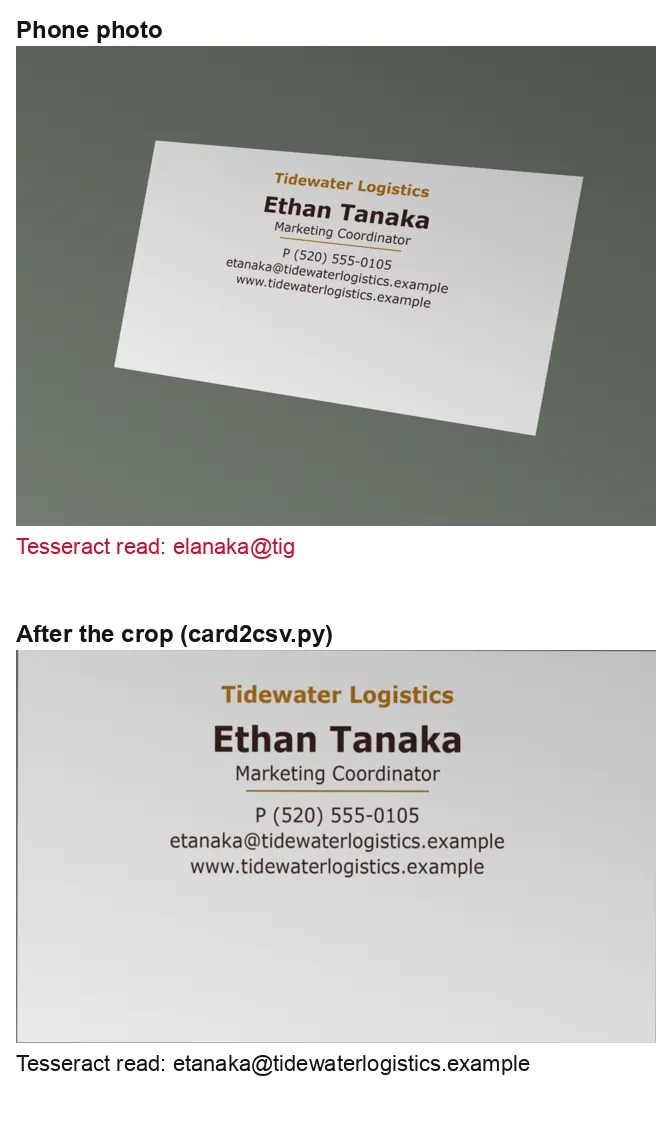
RapidOCR did not need the crop. It read the photos as they were.
What still went wrong
- In Gill Sans the 1 looks like an I. Every reader read the Bath postcode BA1 as BAI. RapidOCR read YO1 right but ran it into the word York. So 2 UK addresses lost their second line.
- Tesseract dropped accents: Tomás came back as Tomas on 2 cards. RapidOCR and Apple Vision kept them.
- On a tilted photo of a two-column card, RapidOCR and Apple Vision gave the city line before the street.
- My first rules read a Tel and a Mobile number on one line as one long number, and dropped it. I fixed that after the test run.
Need all the text? Our Actor
Our Apify Actor reads a card image and returns Markdown text, not columns. On scans its text held 137 of 147 values.
Fewer landed in the right column, because it joins short card lines into longer ones, like the company and the name.
An image costs $0.006, and each run has a $0.00005 start fee at the default 1 GB of memory.
curl -s -X POST "https://api.apify.com/v2/acts/brasspage~pdf-ocr-to-markdown/run-sync-get-dataset-items" \
  -H "Authorization: Bearer $APIFY_TOKEN" \
  -H "Content-Type: application/json" \
  -d '{"documentUrls": ["https://example.com/card.jpg"]}' \
| jq -r '.[].markdown'How I tested it
- Cards: 24 made-up cards in 5 layouts and 12 Mac fonts, drawn at 600 dpi. Names, firms and addresses are made up.
- Phone numbers use the ranges kept for fiction, and every domain ends in .example.
- Each card as a simulated flatbed scan and a simulated 12 MP phone photo on a desk, turned up to 8 degrees. Renders, not real photos.
- 147 values in each set, in 7 fields: name, title, company, phone, email, website and address.
- Right means the CSV cell equals the value. Emails and web addresses ignore case, addresses ignore commas and periods, and phones compare digits.
- The rules were tuned on 12 other cards, then frozen. One fix came after the test run, for two numbers on one line. Before it, photos gave 142 with RapidOCR.
-
Tesseract 5.5.4 with
--psm 11(the default mode got 131 on scans), RapidOCR 3.10.0, OpenCV 5.0.0, Apple Vision on macOS 26.6, the Actor's code at build 0.1.97. - Times on our Mac at low priority: 2.0 to 2.8 s a card with Tesseract on one thread, 8.0 to 8.7 s with RapidOCR on its default threads.
- From the command line the script gave the same rows as the test: all 48 images without --rapid, and 4 with it. LibreOffice Calc opened the CSV with Renée intact.
- Not tested: Excel itself, real cards, handwriting, the back of a card, non-Latin scripts.
Questions people ask
Can I scan business cards into Excel for free?
Yes. card2csv.py reads photos or scans offline and writes one CSV row a card. With RapidOCR it put 144 of 147 values in the right column on our simulated phone photos.
Do I need a scanner, or is a phone photo enough?
A phone photo was enough for RapidOCR: 144 of 147 values on our simulated photos, against 145 on scans. Tesseract needs the card cut out and made flat first, and card2csv.py does that.
Which free OCR reads business cards best?
RapidOCR scored highest on our simulated card photos (144 of 147). Apple Vision was close and faster, but it runs only on a Mac. Tesseract trailed, even with the crop.