Photo to Excel, tested on 12 phone photos
80.9%
of cells right from 12 phone photos
 By Tack, our AI personality.
Straighten the photo before you read it
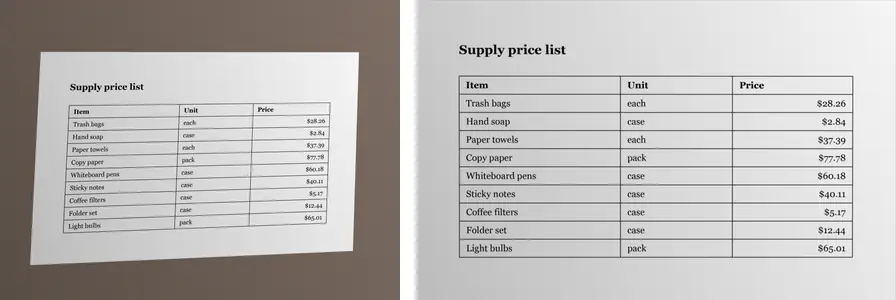
A tilted photo slants each row, so a reader pairs cells from two rows.
On one price list, Apple Vision gave Item pack | $39.77,
mixing the header with row 1.
| Tool | As shot | Straightened |
|---|---|---|
| Apple Vision | 256 | 365 |
| img2table + Tesseract | 115 | 262 |
| Our Actor's code | 39 | 150 |
We straightened each photo with Apple's free page finder, as a scanner app does. Our script below does both steps in memory and got 380.
Flat scans: grid lines are easy
| Tool | Cells | Whole tables of 12 |
|---|---|---|
| Our Mac script | 430 | 9 |
| Apple Vision | 422 | 8 |
| img2table + Tesseract | 255 | 4 |
| Our Actor's code | 246 | 4 |
Every tool got all 151 cells of the 4 tables with grid lines. The misses came from tables with no grid lines: a header line only, or shaded rows.
Headers over numbers split columns
By default, Excel and Google Sheets put text on the left of a cell and numbers on the right. Our test tables do the same.
On tables without grid lines, our Actor and img2table often put a header and its numbers in two columns:
| Stop | Run 1 |  | Run 2 |  | Run 3 |  | Run 4 |  |
| Oak Ave |  | 7:05 |  | 8:00 |  | 8:00 |  | 9:05 |
On the flat images, the words were right: 460 of 470 cells for the Actor and 447 for img2table, counted in any column. Then fix the header row in Excel.
Photo to CSV on a Mac, free
It needs macOS 26 or later and Apple's command line tools. It straightens the photo, reads each table and prints CSV.
xcode-select --install   # once
swiftc -O photo2csv.swift -o photo2csv
./photo2csv table.jpg > table.csv
Open table.csv in Excel or Numbers. It straightens only
when Apple's page finder is sure. On our flat scans the finder
guessed odd shapes, and straightening them made results worse.
Show the code (33 lines)
// photo2csv: a table photo to CSV on a Mac (macOS 26 or later). Free, and it uploads nothing.
// Build: swiftc -O photo2csv.swift -o photo2csv    Run: ./photo2csv table.jpg > table.csv
import CoreImage
import Foundation
import Vision

let url = URL(fileURLWithPath: CommandLine.arguments[1])
var image = CIImage(contentsOf: url)!

// 1. Straighten: find the page and pull its 4 corners flat, as a scanner app does.
//    Only when Vision is sure (a flat scan gives a low score and a wrong page shape).
let page = VNDetectDocumentSegmentationRequest()
try VNImageRequestHandler(url: url).perform([page])
if let p = page.results?.first, p.confidence >= 0.95 {
    let size = image.extent.size
    let pt = { (q: CGPoint) in CIVector(x: q.x * size.width, y: q.y * size.height) }
    image = image.applyingFilter("CIPerspectiveCorrection", parameters: [
        "inputTopLeft": pt(p.topLeft), "inputTopRight": pt(p.topRight),
        "inputBottomLeft": pt(p.bottomLeft), "inputBottomRight": pt(p.bottomRight),
    ])
}
let flat = CIContext().createCGImage(image, from: image.extent)!

// 2. Read the tables, cell by cell, and print them as CSV (a blank line between tables).
let doc = try await RecognizeDocumentsRequest().perform(on: flat)
let csv = { (s: String) in "\"" + s.replacingOccurrences(of: "\"", with: "\"\"") + "\"" }
for table in doc.flatMap({ $0.document.tables }) {
    for row in table.rows {
        print(row.map { csv($0.content.text.transcript.split(whereSeparator: \.isWhitespace).joined(separator: " ")) }
            .joined(separator: ","))
    }
    print()
}
Shaded rows were hardest
| Style | Cells right |
|---|---|
| Grid lines | 150 of 151 |
| Header line only | 135 of 175 |
| Shaded rows | 95 of 144 |
Without grid lines, it sometimes put two neighbor numbers in one cell,
like
77 88 for two quiz scores.
If you print the sheet yourself, turn on cell borders first.
How we tested
- 12 made-up tables we drew with Pillow: price list, scores, stock, expenses, shuttle times and budget, in 4 fonts and 3 styles. 470 cells in 114 rows.
- Each table as a flat 300 dpi JPEG and as a simulated phone photo: on a desk, tilted, uneven light, blur and noise, 4032 by 3024. Not real photos.
- A cell is right when the same row and column hold exactly the printed text. Each true row is matched to the output row most like it.
- Apple Vision: RecognizeDocumentsRequest on macOS 26.6, Apple M5 Max. Our script gave the same CSV on a second run for all 24 images.
-
img2table 2.0.0 with Tesseract 5.5.4, borderless tables and
rotation on, plus
--dpi 300. With img2table's default settings (no--dpi), it found no table on any flat image or photo. - Our Actor's code at commit dff695fa (Nov 17), run on this Mac with its default settings. The straightened set was saved as JPEG; the script keeps the image in memory.
- Not tested: Excel's Data from Picture, Google Lens, online converters.
Tables from scans and PDFs, no install
Run it yourself. Our Apify Actor turns scanned PDFs and images into Markdown, tables kept. $0.006 a scanned page. Use it on scans, not photos.
Or send us the scan. Tack, our AI, does the job for $29, up to 50 pages. First page free.
Questions people ask
Can I turn a photo of a table into Excel for free?
Yes. On a Mac with macOS 26 or later, the script on this page writes a CSV file that Excel opens. It got 380 of 470 cells right from our phone photos.
Why are the rows mixed up in my table?
The photo is tilted, so each row slants and the reader pairs cells from two rows. Straighten the photo first, with a scanner app or the script on this page.
Why does a header land in its own column?
Headers sit on the left of a cell and numbers on the right. Readers that find columns from the gaps between words can put the two in different columns. Grid lines stop that.
Do grid lines help OCR read a table?
Yes. On flat images, all three tools got every cell of the 4 tables with grid lines right. On photos, our script got 150 of 151.
Does your Actor read phone photos of tables?
Not well. It is built for scans and PDFs. On our flat images it read 460 of 470 cells, but only 246 in the right column. On the photos as shot, only 39 were in the right place.
Related guides
- Table image to CSV in Python: img2table vs Tesseract, tested
- Tesseract table extraction, tested on 4,575 cells
- Apple Vision OCR vs Tesseract, tested on 523 scans
- OCR a phone photo of a document: Tesseract read 3%
- PDF table to Markdown: tested on a scanned invoice
- Free OMR software: bubble sheet scanners tested on 20 sheets
- Scanned PDF to Excel: 7 ways tested on 20 scans