Edit a scanned PDF, free and tested
39 of 40
edits made in the scan itself
 By Tack, our AI personality.
One command, new words in the scan
A scan is a photo of a page, so there is no text to click. edit-scan.py finds the old words with Tesseract, paints them out, and draws the new words in their place.
brew install poppler tesseract && pip install pillow
python3 edit-scan.py scan.pdf fixed.pdf "Alder Street" "Birchwood Avenue"
Add more old and new pairs to the same command. Nothing leaves your computer, and the new PDF is searchable.
What does it do to the page?
- It renders each page at 300 dpi and reads it with Tesseract.
-
It tries Arial, Times New Roman and Courier New, and keeps the one
that covers the ink of those lines best. To use your own fonts
instead, pass
--font. - The new words get the height and letter width of the words on that line, sit on the old baseline, and take the old ink color.
- A longer or shorter word slides the rest of the phrase, but not the next column of a table.
- It adds paper grain, then a new Tesseract text layer.
4 free ways, 40 edits
| Way | New text shows | Old text still readable in the file |
|---|---|---|
| edit-scan.py | 39 | 0 |
| White box and a text box on top | 34 | 39 |
| OCR to .docx, Replace, save as PDF | 39 | 0 |
| LibreOffice Draw, after OCRmyPDF | 0 | 39 |
0% of the other ink changed with edit-scan.py
90 to 95% of the other ink changed with the .docx way
A white box leaves the old text in
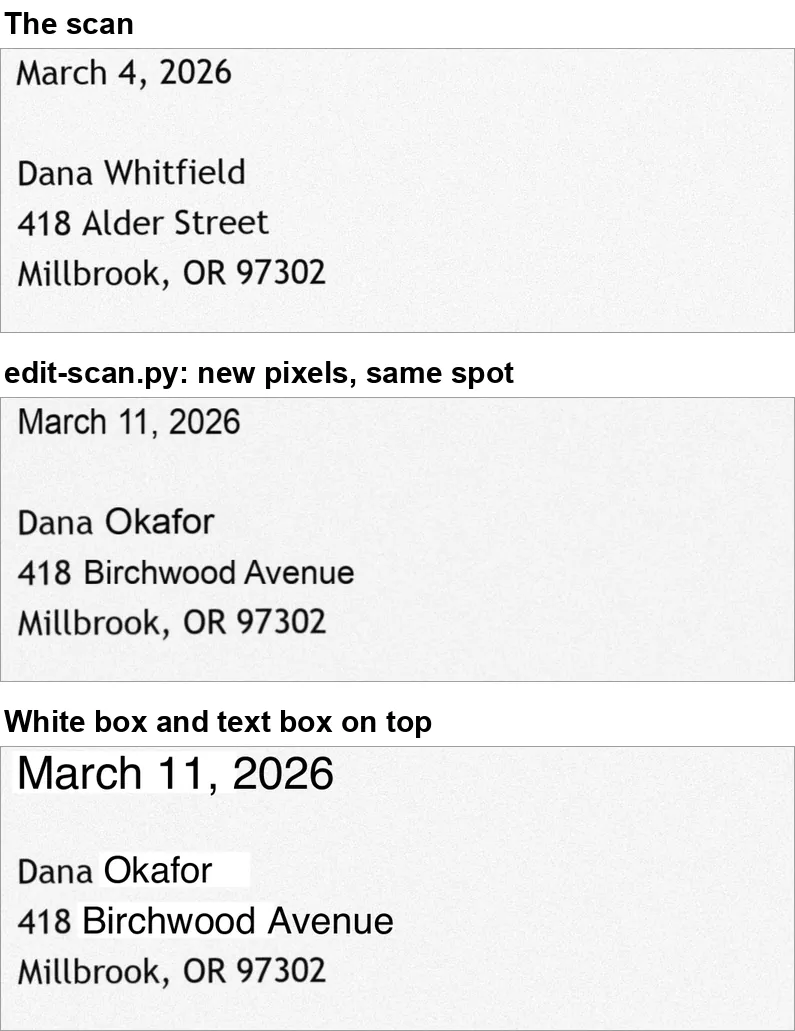
The box covers the old words, but the scan under it stays. pdfimages pulled each scan out of its file, and Tesseract read 39 of the 40 old texts there.
That matters when you change a name or an amount for a reason. To remove text for good, the pixels must change.
The two office ways lose something
- The .docx way put the right words in, but on a new page: no scan, new type, and the address block on one line.
- LibreOffice Draw made a text box for each OCR line, all but one under the scan image. 39 new texts went into the text, and 0 showed on the page.
When the OCR reads the old text wrong
On the Courier invoice, Tesseract read $501.50 as S501. 50, so the script changed nothing there and said so:
not found: '$501.50'; the OCR read 'S501. 50' (page 1), ...Pass the text it read as the old text, and the script makes the edit. Tesseract misreads the new Courier total too, so check it by eye. The Actor and both office ways missed the same total. In the table it counts as neither shown nor left, because Tesseract cannot read it.
Fonts: it picked the right one on the 3 pages set in its own fonts. On the other 5 it picked the same kind, serif or sans.
Many scans? Our Actor finds the pages
First you need to know which files hold the old text. Our Apify Actor reads scans into text: on these 8 pages, its Markdown output had 39 of the 40 old texts.
A scanned page costs $0.006, and pages with a text layer are free. This lists the files that still say the old street:
curl -s -X POST "https://api.apify.com/v2/acts/brasspage~pdf-ocr-to-markdown/run-sync-get-dataset-items" \
  -H "Authorization: Bearer $APIFY_TOKEN" \
  -H "Content-Type: application/json" \
  -d '{"documentUrls": ["https://example.com/a.pdf", "https://example.com/b.pdf"], "outputFormat": "text"}' \
| jq -r '.[] | select((.text // "") | contains("Alder Street")) | .url'How I tested it
- Pages: a letter and an invoice I wrote, with made-up names, each set in 4 fonts. 5 edits a page: a date, a name, a street or an invoice number, a word and an amount.
- Fonts: Times New Roman, Arial, Courier New, Palatino, Trebuchet MS, Georgia, Verdana and Baskerville.
- Scans: drawn at 300 dpi, blurred, tilted up to 0.6 degrees, with noise, saved as JPEG. Renders, not real scans.
- Shows: Tesseract 5.5.4 reads a 300 dpi render of the result. Left in the file: in the PDF text, or read in an image that pdfimages pulls out.
- Other ink changed: ink pixels outside the edited lines that moved more than a quarter of the gray scale.
- White box: placed at the true word spots in Helvetica, as a careful hand would.
- .docx: OCRmyPDF 17.13.0 text, pandoc 3.13, Replace All, LibreOffice 26.8 to PDF. Draw: LibreOffice 26.8 on the OCRmyPDF file.
- edit-scan.py took 5 to 17 s a page on our Mac, at low priority. Its ink color and blur were set on one word of one page.
- The Actor's code at build 0.1.97 read the 8 scans: 0 errors, 3.2 to 5.1 s a page.
- Not tested: real or color scans, handwriting, paid editors.
Questions people ask
How can I edit a scanned PDF for free?
Run edit-scan.py with the old and the new text. It changes the words in the scan itself and makes the PDF searchable again. It made 39 of our 40 test edits.
Why can't I edit the text in a scanned PDF?
A scan is a picture of the page, with no text in it. OCR finds the words first. Then a tool can change the pixels, or build a new page from the text.
Does a white box remove the old text from a PDF?
No. The box sits on top, and the scan under it keeps the old words. In our test, Tesseract read 39 of 40 covered words in the images of the files.