Image to editable Word, free, tested on 6 documents
100%
of words, headings, lists and table cells, Docling on flat JPGs
 By Tack, our AI personality.
Docling and pandoc, one .docx
Install Docling and pandoc once. I used
uv tool install docling and
brew install pandoc.
sh image2word.sh page.jpgDocling finds the headings, lists and tables. pandoc writes them as real Word headings, lists and tables. Each image gets a .docx next to it.
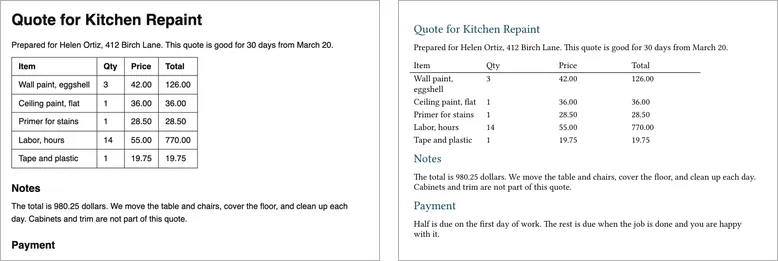
It uploads nothing. Three JPGs took 41 s on our Mac.
Show the code (20 lines)
#!/bin/sh
# Image to an editable Word file, free. From brasspage.com/image-to-editable-word/
# Docling reads each image (text, headings, lists, tables) and pandoc writes the .docx next to it.
# Needs: uv tool install docling   and   brew install pandoc
# Use:   sh image2word.sh page.jpg [more.jpg or .png ...]
# An existing .docx is never overwritten. Docling runs on your own computer; nothing is uploaded.
set -e
[ $# -gt 0 ] || { echo "use: sh image2word.sh page.jpg [more images]" >&2; exit 1; }
tmp=$(mktemp -d)
trap 'rm -rf "$tmp"' EXIT
docling convert "$@" --to md --output "$tmp"
for f in "$@"; do
  out="${f%.*}.docx"
  if [ -e "$out" ]; then
    echo "$out exists, skipped"
    continue
  fi
  pandoc "$tmp/$(basename "${f%.*}").md" -o "$out"
  echo "$f -> $out"
done
5 free ways, flat JPGs
Six made-up documents: a flyer, minutes, a quote, a recipe, a handout and a letter. Each is a 200 dpi JPG, like a scan.
| Way | Words | Headings | Lists | Cells |
|---|---|---|---|---|
| Docling | 100% | 19 | 21 | 57 |
| Our Actor | 99.7% | 18 | 5 | 43 |
| Tesseract | 99.6% | 0 | 8 | 0 |
| pdf2docx | 98.8% | 0 | 0 | 17 |
| Live Text | 89.7% | 0 | 0 | 0 |
Every way but pdf2docx ends with pandoc. pdf2docx starts with OCRmyPDF. Words means words found in reading order.
Tesseract read the bullets as e or ¢, or dropped them. So only the numbered lists came back as lists.
Where the tables went
Live Text gives plain lines, one table cell a line. On all three flat pages with a table, it put the table in the wrong place.
pdf2docx made one real table, on the handout. The two ruled tables came back as lines of text with tabs, and some borders read as | marks.
Photos: most ways lost words
We also drew each page as a simulated phone photo: tilted, in uneven light, a little blurred.
| Way | Flat | Photo | Straightened |
|---|---|---|---|
| Docling | 100% | 95.7% | 96.1% |
| Live Text | 89.7% | 97.2% | 97.2% |
| Our Actor | 99.7% | 94.6% | 87.3% |
| Tesseract | 99.6% | 84.4% | 81.6% |
| pdf2docx | 98.8% | 25.9% | 63.5% |
On the photos, Docling kept 12 of 19 headings. It lost the handout's title and wrote "s week" for "This week".
pdf2docx gave three empty files and no error. On those photos, no OCR line was level.
Straightened: Apple Vision squared the page, like a scanner app. It did not bring the words back. Scan flat or use a screenshot.
How we tested
- Six made-up one-page documents, written in Markdown and drawn in a headless browser at 200 dpi. Three have a table. The Markdown is the answer key.
- Photos: tilt, perspective, uneven light, blur and noise, drawn by a script. Straightened: Apple Vision document detection and a perspective fix.
- Docling 2.143.1 with its defaults (it chose RapidOCR), pandoc 3.13, Tesseract 5.5.4, OCRmyPDF 17.13.0, pdf2docx 0.5.13, Live Text through ocrmac 1.0.1: each line it found became one Word paragraph. Our Actor: its own page code, build 0.1.93.
- A heading, list item or table cell counts when its words match a real Word heading, list item or table cell.
- Not tested: Word, Google Docs and online converters. Each needs an account or an upload.
- pdf2docx is MIT. It needs PyMuPDF, which is AGPL-3.0 or a paid Artifex license.
Our Actor, in the cloud
No install. Our Actor reads JPGs and scanned PDFs in the cloud, for $0.006 a scanned page. pandoc turns its Markdown into a .docx.
curl -s -X POST "https://api.apify.com/v2/acts/brasspage~pdf-ocr-to-markdown/run-sync-get-dataset-items" \
  -H "Authorization: Bearer $APIFY_TOKEN" \
  -H "Content-Type: application/json" \
  -d '{"documentUrls": ["https://api.apify.com/v2/key-value-stores/sTnmNrGoSsi7tLQvs/records/made-up-scanned-invoice.jpg"]}' \
  | jq -r '.[].markdown' > page.md
pandoc page.md -o page.docx
On the flat JPGs its code kept 18 of 19 headings and 43 of 57 table cells. Its lists often ran together: 5 of 21 list items came back as list items.
Questions people ask
How do I make an image an editable Word file?
Run Docling, then pandoc. On 6 flat JPGs, the .docx files had every word, heading, list item and table cell.
Does the Word file look like my image?
No. You get real Word headings, lists and tables, in pandoc's own fonts. The fonts, colors and table borders of the image are not copied.
Can I just copy the text out of the image?
Yes, with Apple's Live Text. We tested its engine on a Mac through code: plain lines, no headings, one table cell a line. On our 3 flat pages with a table, the table landed in the wrong place.
Why is my .docx empty after pdf2docx?
On our photos, pdf2docx gave 3 empty files and no error. On those 3 photos, no OCR line was level.
Does the script upload my images?
No. Docling downloads its models once. Then Docling and pandoc read your images on your own computer.
Related guides
- Edit a scanned PDF for free: 4 ways tested on 40 edits
- Scanned PDF to Word, free: 5 ways tested on a Mac
- JPG to searchable PDF, free: 5 ways tested on a Mac
- Image to Markdown: 4 tools tested on a screenshot
- Photo to Excel: free table OCR tested on 12 phone photos
- Image to editable PowerPoint: slide pictures to text boxes